





Valentine Hearts Background For PowerPoint With Clear Diamond-Cut Crystals
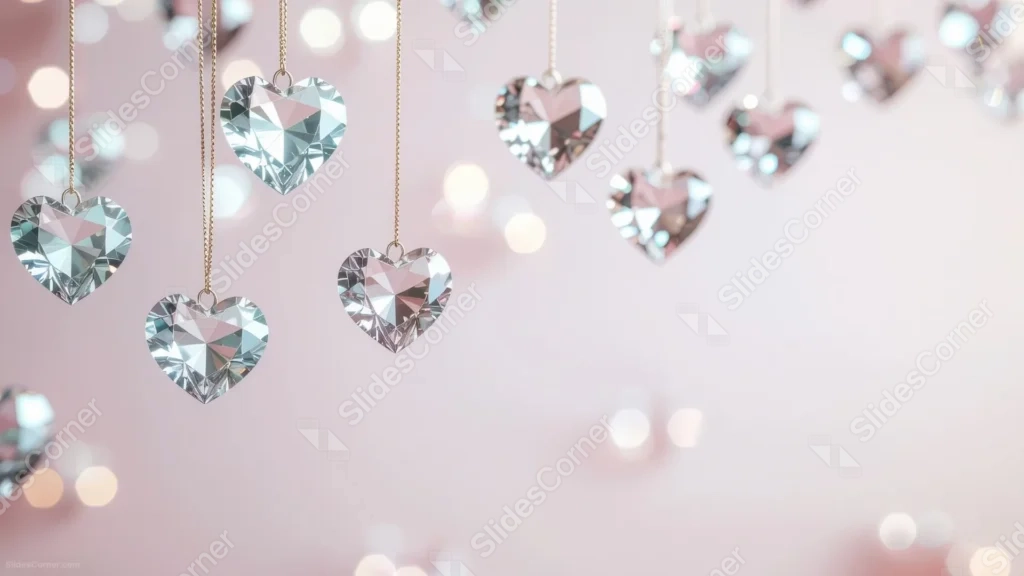
A valentine hearts background for PowerPoint with clear diamond-cut crystal hearts and a wide open pink corner.
This background is for Valentine’s Day slides that want real sparkle instead of a flat red heart clipart. Clear, diamond-cut crystal hearts hang from thin gold chains and pale threads against a soft pink wall, with a generous open corner left for your text. Free, HD, and watermark-free for PowerPoint or Google Slides.
What This Valentine Hearts Background Looks Like
More than a dozen faceted crystal hearts dangle at different heights across the top and left of the frame, each one cut like a real diamond so it splits light into sharp little triangles of white, silver, and pale pink rather than glowing a solid color.
Soft warm bokeh circles drift behind the hearts on the left, fading into a clean, almost solid blush-pink wall on the right, where the frame is left completely open.
Where This Background Fits
Reach for this on Valentine’s Day event invites, romantic dinner or proposal slideshows, jewelry and gift shop promotions, or a February newsletter cover slide. The large clear zone also makes it easy to drop in a countdown or a discount code.
Design Choices Behind These Crystal Hearts
I kept the hearts clear rather than tinting them pink, because a true diamond cut reads as more expensive and more real when it’s colorless and just catching ambient light off the wall behind it. Color from a dyed crystal tends to flatten the facets; clear glass keeps every edge crisp.
The biggest structural decision was pushing every single heart to the top-left two-thirds of the frame and leaving the entire bottom-right corner untouched. Instead of scattering charms edge to edge with small gaps between them, this gives you one large, genuinely empty zone, which is a lot easier to design a title or a logo into than hunting for gaps.
How to Apply This Background in PowerPoint
- Download and unzip the file, then open your PowerPoint presentation.
- Go to the Design tab and click Format Background.
- Choose Picture or texture fill, then Insert picture from a file, and select the downloaded image.
- Click Apply to All to use it across the whole deck, or leave it on a single slide.
How to Apply This Background in Google Slides
- Open your presentation and go to Slide, then Change background.
- Click Choose image and upload the downloaded file.
- Click Done to apply it to the current slide.
- To apply it across every slide, make the change from the master theme instead.
Legibility Tip for This Background
Keep your text in the open bottom-right corner rather than over the hearts. Deep plum, burgundy, or charcoal text gives the strongest contrast against the pale pink there, and white text also works well with a soft shadow.
FAQ
Is this valentine hearts background free? Yes, it’s a free download with no watermark and no attribution required.
Does it work in Google Slides? Yes, it uploads directly as a custom background image, no conversion needed.
What resolution is the file? It’s full HD at 1920×1080, so it stays sharp on any screen or projector.
Can I use this as a wallpaper? Yes, the soft pink tone and sparkle work well as a desktop background too.
Features at a Glance
- Free HD 1920×1080 download, no watermark
- Clear, diamond-cut crystal hearts on gold chains and pale threads
- Soft blush-pink wall with warm bokeh on the left
- Large open corner in the bottom right for text
- Works in PowerPoint, Google Slides, and as a wallpaper
- Romantic, celebratory mood suited to Valentine’s Day and gift promotions
Specs
- 1920 x 1080 px · 16:9 widescreen
- JPG, high quality, no compression artefacts
- PowerPoint · Google Slides · Keynote · Canva
- No watermark · no sign-up
- Free for personal and commercial use
You can use this Sparkling Crystal Hearts Background With A Wide Open Blush Pink Corner For Presentations as a Wallpaper or use it as a background for slides.
Looking for something different? Browse all our free PPT Backgrounds, or see how to set a background in PowerPoint and Google Slides.








