You might also like:


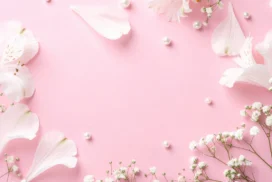


This elegant professional PPT background surrounds a blush pink surface with real peach and cream roses, then rings the open center with faceted diamond crystals.
Every rose here is photographed rather than illustrated, keeping the whole piece grounded in real texture and light.
What This Elegant Professional Background Looks Like
Full peach and cream roses with green leaves fill each corner, joined by a few loose sprigs of small pink and white blossoms and scattered petals.
Faceted diamond crystals of varying sizes trace a loose ring around the open center, rather than scattering randomly across the whole frame.
The background stays a smooth, solid blush pink throughout, with no added texture or staining behind the flowers and gems.
Where This Elegant Professional Background For PPT Fits
It suits corporate wedding-industry decks, luxury retail presentations, beauty brand pitches, and any professional deck wanting a refined, feminine touch.
The wide open center also works well for a company name, a quote, or key statistics.
Design Choices Behind the Diamond Ring Border
I used only real peach and cream roses, rather than mixing in other flower colors, so the palette stays quiet and consistent enough for a professional deck.
Arranging the faceted diamonds in a loose ring around the open center, instead of scattering them randomly, makes them read as a deliberate frame rather than confetti.
I kept every rose photographed rather than illustrated, so the petals carry genuine texture and light rather than a flat, drawn look.
How to Apply It in PowerPoint
- Go to Design > Format Background.
- Choose Picture or texture fill, then Insert from file.
- Click Apply to All to use it across the whole deck.
How to Apply It in Google Slides
- Open Slide > Change background.
- Click Choose image and upload the downloaded file.
- Select Done, repeating on any other slides you want to match.
Legibility Tip for This Elegant Professional Background
Keep text centered inside the diamond ring, using a dark charcoal or deep rose font, for clear contrast against the plain blush surface.
Frequently Asked Questions
Is this elegant professional background free?
Yes, it’s a free download with no watermark and no account required.
Does it work in PowerPoint too?
Yes, it’s a standard image file, so it applies the same way in both Google Slides and PowerPoint.
What resolution is included?
1920×1080 px, HD 16:9, suited to slides and to a desktop or phone wallpaper.
Can I use it as a wallpaper?
Yes, the 16:9 ratio matches most laptop and desktop screens.
Features at a Glance
- HD 1920×1080 resolution, 16:9 ratio
- Free download, no watermark
- Real photographed peach and cream roses in every corner
- Faceted diamonds arranged in a loose ring border
- Smooth, solid blush pink background
- Works as a PowerPoint background, Google Slides background, or wallpaper
Specs
- 1920 x 1080 px · 16:9 widescreen
- JPG, high quality, no compression artefacts
- PowerPoint · Google Slides · Keynote · Canva
- No watermark · no sign-up
- Free for personal and commercial use
You can use this Refined Elegant Professional Background For PPT as a Wallpaper or use it as a background for slides.
Looking for something different? Browse all our free PPT Backgrounds, or see how to set a background in PowerPoint and Google Slides.