You might also like:




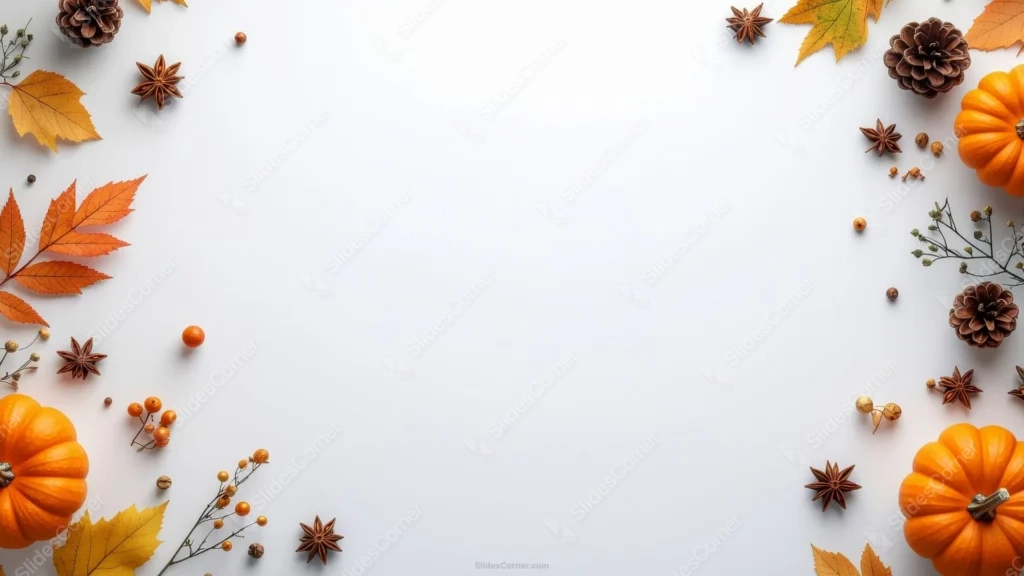
This autumn background for PowerPoint is styled like a harvest table, not a stock illustration. Small orange pumpkins sit in two corners, surrounded by real pinecones, star anise pods, dried berry sprigs, and maple leaves, all on plain white.
Every prop is photographed, not drawn, so the textures hold up close: the pumpkin’s ridged skin, the pinecone’s overlapping scales, the star anise’s papery points.
What This Autumn Background For PowerPoint Looks Like
Star anise pods repeat several times around the frame, once in each top corner and again along the right edge, acting almost like a signature spice motif rather than a one-off prop.
Two small pumpkins anchor the lower-left and right side, kept modest in size rather than oversized, so they read as an accent instead of the main subject.
Yellow and orange maple leaves fill the top-left and bottom-left corners, and thin, dried berry branches thread through the gaps between the larger props on both sides.
Where This Autumn Background Fits
It suits Thanksgiving and harvest-season presentations, cafe and recipe decks, seasonal marketing slides, school and classroom content, and any deck that wants a cozy, spiced-autumn feel without leaving the white template clean.
The wide open center works well behind a menu, a countdown to an event, or a simple seasonal greeting, since none of the props crowd toward the middle.
Design Choices Behind the Props and Layout
I chose real photographed props over illustrated ones because texture sells the season better than flat color does. A pumpkin’s ridges and a pinecone’s layered scales read as tactile in a way a vector icon never quite manages.
Repeating the star anise around the frame instead of using it once gave the border a rhythm, so your eye connects the corners to each other rather than treating each one as a separate cluster.
I kept the pumpkins small and off-center on purpose. A large pumpkin in the middle would turn this into a pumpkin photo with a white border; small ones at the edges keep it a background.
How to Apply It in PowerPoint
- Open your slide, go to Design > Format Background.
- Choose Picture or texture fill, then Insert from file and select the downloaded image.
- Click Apply to All for the whole deck, or leave it on a single title or cover slide.
How to Apply It in Google Slides
- Open Slide > Change background.
- Click Choose image and upload the downloaded file.
- Select Done. Repeat on each slide you want to match, since Slides applies backgrounds one at a time.
Legibility Tip for This Autumn Background
Keep text in the open white center, well clear of the pumpkins, pinecones, and leaves at the edges. Dark brown, black, or deep orange type all read cleanly against the plain background.
Frequently Asked Questions
Is this autumn background free?
Yes, it’s a free download with no watermark and no account required.
Does it work in Google Slides too?
Yes. It’s a standard image file, so it uploads and applies the same way it does in PowerPoint.
What resolution is included?
1920×1080 px, HD 16:9, suited to slides and to a desktop or phone wallpaper.
Can I use it as a wallpaper?
Yes, the 16:9 ratio matches most laptop and desktop screens.
Features at a Glance
- HD 1920×1080 resolution, 16:9 ratio
- Free download, no watermark
- Real photographed pumpkins, pinecones, and star anise
- Dried berry sprigs and autumn maple leaves at the corners
- Wide open white center built for text
- Works as a PowerPoint background, Google Slides background, or wallpaper
Specs
- 1920 x 1080 px · 16:9 widescreen
- JPG, high quality, no compression artefacts
- PowerPoint · Google Slides · Keynote · Canva
- No watermark · no sign-up
- Free for personal and commercial use
You can use this Cozy Harvest Pumpkin and Spice Background for Autumn Presentations as a Wallpaper or use it as a background for slides.
Looking for something different? Browse all our free PPT Backgrounds, or see how to set a background in PowerPoint and Google Slides.