




Medieval Church Background For PowerPoint With A Sunlit Gothic Window
Download this free medieval church background for PowerPoint with a sunlit Gothic window.
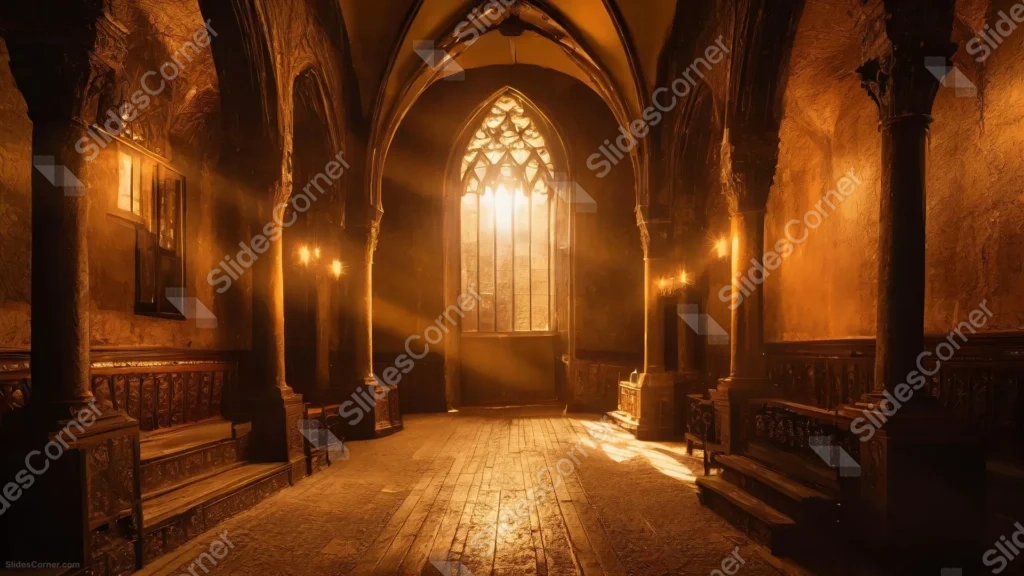
This medieval church background for PowerPoint looks down a stone Gothic nave toward a tall arched window, sunbeams cutting through the amber-brown air.
Candle sconces glow along the carved stone columns on either side, and a worn wooden floor runs straight down the open center aisle.
What This Medieval Church Background Looks Like
A vaulted stone ceiling arches overhead, framed by rows of carved columns and wooden choir stalls on either side of the aisle.
At the far end, a tall, pointed Gothic window with tracery lets in a warm, golden light that fans out into visible sunbeams across the room.
The entire scene sits in one warm amber-brown palette, from the stone walls to the wooden floor, broken only by small pools of candlelight along the sides.
Where This Medieval Church Background For PowerPoint Fits
- History, religious studies, or theology presentations
- Fantasy, medieval, or storytelling decks
- Architecture or heritage tourism slides
- Weddings or ceremonies with a solemn, reverent tone
Design Choices Behind the Sunlit Gothic Window
I let a single arched Gothic window carry all the light in the scene, sending it down the aisle as visible sunbeams instead of lighting the room evenly.
Keeping the stonework and columns in the same warm amber-brown as the light itself means nothing else in the frame competes with that window.
I left the center aisle clear and unobstructed, since a straight, open path down the middle gives text somewhere calm to sit against all that architectural detail.
How to Apply It in PowerPoint
- Go to Design > Format Background.
- Choose Picture or texture fill, then Insert from file.
- Click Apply to All to use it across the whole deck.
How to Apply It in Google Slides
- Open Slide > Change background.
- Click Choose image and upload the downloaded file.
- Select Done, repeating on any other slides you want to match.
Legibility Tip for This Medieval Church Background
Place text along the darker lower floor near the front, using a cream or pale gold font so it holds up against the deep brown stone.
Frequently Asked Questions
Is this medieval church background free?
Yes, it’s a free download with no watermark and no account required.
Does it work in Google Slides too?
Yes, it’s a standard image file, so it applies the same way in both PowerPoint and Google Slides.
What resolution is included?
1920×1080 px, HD 16:9, suited to slides and to a desktop or phone wallpaper.
Can I use it as a wallpaper?
Yes, the 16:9 ratio matches most laptop and desktop screens.
Features at a Glance
- HD 1920×1080 resolution, 16:9 ratio
- Free download, no watermark
- Tall Gothic window with visible sunbeams
- Warm amber-brown stone and candlelight palette
- Clear, open aisle down the center for text
- Works as a PowerPoint background, Google Slides background, or wallpaper
Specs
- 1920 x 1080 px · 16:9 widescreen
- JPG, high quality, no compression artefacts
- PowerPoint · Google Slides · Keynote · Canva
- No watermark · no sign-up
- Free for personal and commercial use
You can use this Majestic Medieval Church Background For PowerPoint Presentations as a Wallpaper or use it as a background for slides.
Looking for something different? Browse all our free PPT Backgrounds, or see how to set a background in PowerPoint and Google Slides.