






Easter Background For PowerPoint With A Bunny And Golden Eggs
Download this free Easter background for PowerPoint with a bunny and golden eggs.
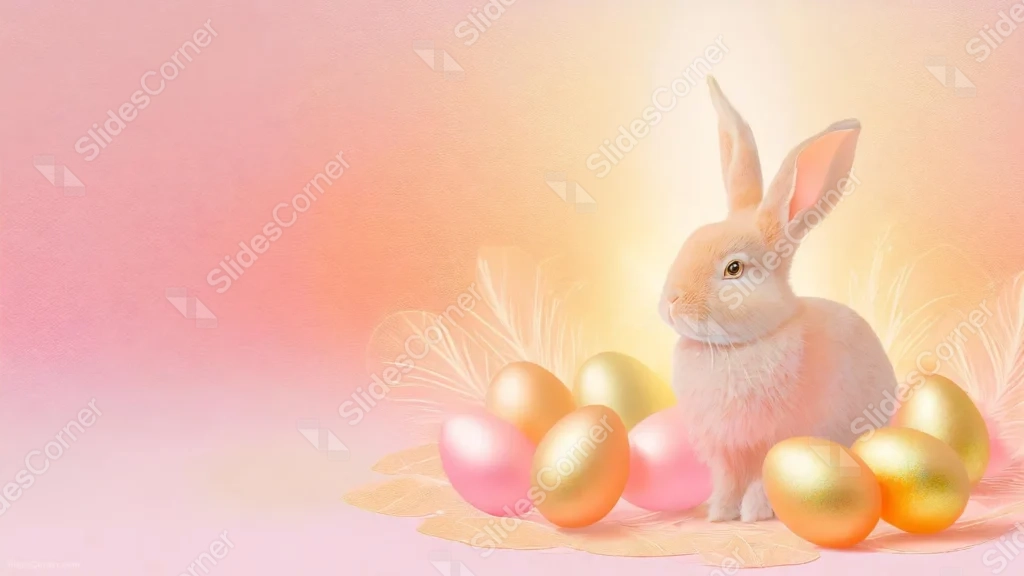
This Easter background for PowerPoint sits a soft, realistic bunny beside a cluster of metallic gold and pink eggs, against a gentle pink-to-peach glow.
Delicate feathers fan out behind the bunny, and the entire left half of the frame stays plain and open.
What This Easter Background Looks Like
A soft, realistically rendered rabbit sits upright on the right side of the frame, its fur catching a warm light glowing behind it.
Metallic gold eggs cluster around its base, mixed with just two pink eggs, resting on a bed of pale feathers and soft petals.
The left half of the frame is a smooth, plain gradient moving from soft pink to pale peach, left entirely free of any other elements.
Where This Easter Background For PowerPoint Fits
- Easter, spring, or holiday presentations
- Kids’ events, egg hunts, or family gatherings
- Greeting card or invitation mockups
- Any title slide wanting a warm, seasonal feel
Design Choices Behind the Bunny And Golden Eggs
I painted the rabbit with soft, realistic fur and a warm light source behind it, rather than a flat cartoon style, so it feels gentle and photographic instead of cartoonish.
Mixing metallic gold eggs in with just two pink ones lets the gold read as the dominant color without the piece losing its Easter pastel feel.
I left the entire left half of the frame a plain, soft pink-to-peach gradient, keeping every element confined to the right side for a generous, uncluttered space for text.
How to Apply It in PowerPoint
- Go to Design > Format Background.
- Choose Picture or texture fill, then Insert from file.
- Click Apply to All to use it across the whole deck.
How to Apply It in Google Slides
- Open Slide > Change background.
- Click Choose image and upload the downloaded file.
- Select Done, repeating on any other slides you want to match.
Legibility Tip for This Easter Background
Keep text on the plain left side, using a warm brown or deep pink font so it holds up against the soft gradient.
Frequently Asked Questions
Is this Easter background free?
Yes, it’s a free download with no watermark and no account required.
Does it work in Google Slides too?
Yes, it’s a standard image file, so it applies the same way in both PowerPoint and Google Slides.
What resolution is included?
1920×1080 px, HD 16:9, suited to slides and to a desktop or phone wallpaper.
Can I use it as a wallpaper?
Yes, the 16:9 ratio matches most laptop and desktop screens.
Features at a Glance
- HD 1920×1080 resolution, 16:9 ratio
- Free download, no watermark
- Soft, realistic bunny with a warm glow behind it
- Metallic gold and pink Easter eggs with feather accents
- Wide open pink-to-peach left side for text
- Works as a PowerPoint background, Google Slides background, or wallpaper
Specs
- 1920 x 1080 px · 16:9 widescreen
- JPG, high quality, no compression artefacts
- PowerPoint · Google Slides · Keynote · Canva
- No watermark · no sign-up
- Free for personal and commercial use
You can use this Charming Easter Background For PowerPoint Presentations as a Wallpaper or use it as a background for slides.
Looking for something different? Browse all our free PPT Backgrounds, or see how to set a background in PowerPoint and Google Slides.








