You might also like:
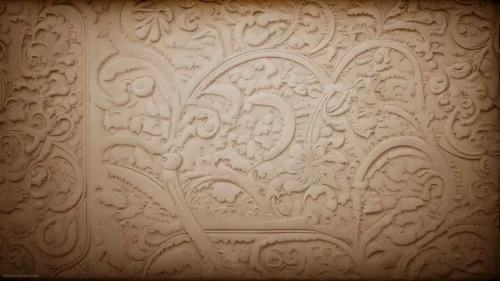
This mandala texture background for PowerPoint photographs a deeply carved stone rosette straight on, its radial pattern filling the entire frame.
Acanthus scrollwork fills the outer ring, while a tighter floral rosette sits at the very center.
What This Mandala Texture Background Looks Like
Concentric rings of carved relief spiral out from a small central medallion, moving from a tight floral rosette to a wider ring of overlapping leaf shapes.
The outermost ring shifts into ornate acanthus scrollwork, its curls catching deeper shadow than the brighter carving at the center.
The entire piece sits in one warm sandstone tone, with all its depth coming from the actual relief of the carving rather than added color.
Where This Mandala Texture Background For PowerPoint Fits
- Art history, architecture, or heritage presentations
- Meditation, yoga, or mindfulness decks
- Museum, restoration, or cultural studies slides
- Any wallpaper wanting a rich, textured stone surface
Design Choices Behind the Carved Stone Rosette
I photographed this straight on rather than at an angle, so the radial symmetry of the carving reads clearly instead of looking skewed.
Keeping the whole piece in one warm sandstone tone lets the depth of the actual relief carving create contrast through shadow rather than added color.
I let the acanthus scrollwork in the outer ring stay slightly darker and less lit than the central rosette, so the eye is drawn naturally toward the middle of the medallion.
How to Apply It in PowerPoint
- Go to Design > Format Background.
- Choose Picture or texture fill, then Insert from file.
- Click Apply to All to use it across the whole deck.
How to Apply It in Google Slides
- Open Slide > Change background.
- Click Choose image and upload the downloaded file.
- Select Done, repeating on any other slides you want to match.
Legibility Tip for This Mandala Texture Background
Use a white or pale font with a subtle shadow or semi-transparent panel behind it, since the carving covers the entire frame with no plain area.
Frequently Asked Questions
Is this mandala texture background free?
Yes, it’s a free download with no watermark and no account required.
Does it work in Google Slides too?
Yes, it’s a standard image file, so it applies the same way in both PowerPoint and Google Slides.
What resolution is included?
1920×1080 px, HD 16:9, suited to slides and to a desktop or phone wallpaper.
Can I use it as a wallpaper?
Yes, the 16:9 ratio matches most laptop and desktop screens.
Features at a Glance
- HD 1920×1080 resolution, 16:9 ratio
- Free download, no watermark
- Deeply carved radial stone rosette
- Ornate acanthus scrollwork in the outer ring
- Warm sandstone tone throughout
- Works as a PowerPoint background, Google Slides background, or wallpaper
Specs
- 1920 x 1080 px · 16:9 widescreen
- JPG, high quality, no compression artefacts
- PowerPoint · Google Slides · Keynote · Canva
- No watermark · no sign-up
- Free for personal and commercial use
You can use this Ornate Mandala Texture Background For PowerPoint Presentations as a Wallpaper or use it as a background for slides.
Looking for something different? Browse all our free PPT Backgrounds, or see how to set a background in PowerPoint and Google Slides.