

Beige Texture Background For PowerPoint With Carved Floral Relief
Download this free beige texture background for PowerPoint with carved baroque floral relief.
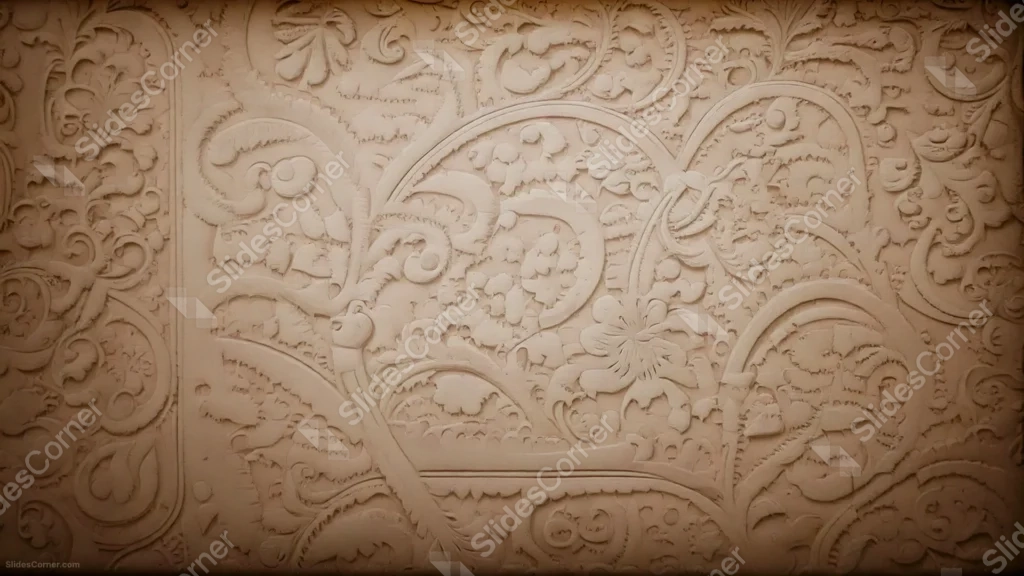
This beige texture background for PowerPoint is carved edge to edge with baroque scrollwork and a central flower medallion, all in one warm tan tone.
Deep shadows sit inside every groove, giving the flat beige surface real sculptural depth without introducing a second color.
What This Beige Texture Background Looks Like
Curling acanthus leaves and scrolling vines cover the entire frame, framing a single blooming flower carved just off-center.
A raised arched border runs through the middle of the composition, echoing a carved panel or cartouche, while the rest of the surface repeats the scrollwork pattern into the corners.
There is no flat, undecorated space anywhere in the frame, only carved relief in varying depth of shadow.
Where This Beige Texture Background For PowerPoint Fits
- Art history, architecture, or antiques presentations
- Interior design or luxury craft decks
- Wedding or heritage-themed slides
- Any wallpaper wanting a rich, tactile pattern
Design Choices Behind the Carved Relief
I built this around flowing baroque scrollwork and a single flower medallion, rather than the tight radial symmetry of a mandala, so the pattern reads as organic carving instead of geometric repetition.
Keeping everything in one beige tone, with depth coming only from shadow, lets the carving itself stay the focus instead of color contrast.
Because the whole frame is carved, I designed this one as a full wallpaper pattern rather than a background with a dedicated clear space for text.
How to Apply It in PowerPoint
- Go to Design > Format Background.
- Choose Picture or texture fill, then Insert from file.
- Click Apply to All to carry it across the whole deck.
How to Apply It in Google Slides
- Open Slide > Change background.
- Click Choose image and upload the downloaded file.
- Select Done, repeating on any other slides you want to match.
Legibility Tip for This Beige Texture Background
- Since the whole surface is carved, add a solid or semi-transparent text box in a deep brown or black so your words don’t blend into the relief.
Frequently Asked Questions
Is this beige texture background free?
Yes, it’s a free download with no watermark and no account required.
Does it work in Google Slides too?
Yes, it’s a standard image file, so it applies the same way in both PowerPoint and Google Slides.
What resolution is included?
1920×1080 px, HD 16:9, suited to slides and to a desktop or phone wallpaper.
Can I use it as a wallpaper?
Yes, the full-frame carved pattern makes it especially well suited as a desktop or phone wallpaper.
Features at a Glance
- HD 1920×1080 resolution, 16:9 ratio
- Free download, no watermark
- Carved baroque scrollwork with a central flower medallion
- Warm, single-tone beige palette with sculpted shadow depth
- Full-frame, edge-to-edge carved pattern
- Works as a PowerPoint background, Google Slides background, or wallpaper
Specs
- 1920 x 1080 px · 16:9 widescreen
- JPG, high quality, no compression artefacts
- PowerPoint · Google Slides · Keynote · Canva
- No watermark · no sign-up
- Free for personal and commercial use
You can use this Ornate Carved Beige Texture Background For PowerPoint as a Wallpaper or use it as a background for slides.
Looking for something different? Browse all our free PPT Backgrounds, or see how to set a background in PowerPoint and Google Slides.








