You might also like:



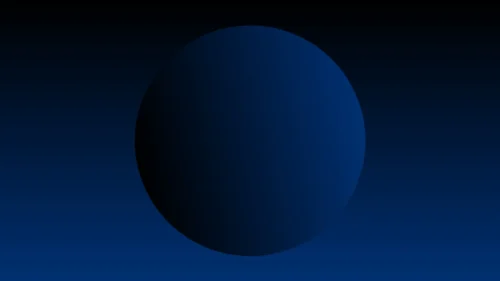


This dark blue sky gradient background for Google Slides stays entirely within one blue family, fading from near-black navy on the left into a soft dark blue-cyan on the right.
No green, teal, or purple mixes in anywhere, giving this the cleanest, most monochromatic read in the series.
What This Dark Blue Sky Gradient Background Looks Like
The far left holds a genuinely near-black navy, staying dark through roughly the first third of the frame before beginning a steady lift in brightness.
Moving right, the color passes through a rich royal blue before softening into a lighter cyan-blue, with a subtle warm glint of near-cream light right where it turns brightest.
That small warm touch keeps the lightest area from feeling cold or flat, settling back into a clean pale sky blue at the very edge.
Where This Dark Blue Sky Gradient Background For Google Slides Fits
- Corporate and finance title slides
- Tech and SaaS product presentations
- Healthcare and professional service decks
- Any keynote wanting a clean, trustworthy blue tone
The dark left side gives a natural, quiet spot for a title, with the lighter right side working well for supporting content.
Design Choices Behind the Cyan Edge
I kept the entire gradient inside one blue family, with nothing else mixed in, since a purely monochromatic fade reads as more clean and professional than a multi-hue one.
Adding a soft warm glint right where the gradient turns lightest stops that edge from feeling cold, giving it a touch of life without introducing a second color family.
Starting from a genuinely near-black navy, rather than a mid-tone, gives the gradient a wider, more dramatic range from end to end.
How to Apply It in Google Slides
- Open Slide > Change background.
- Click Choose image and upload the downloaded file.
- Select Done, repeating on each slide you want to match.
How to Apply It in PowerPoint
- Go to Design > Format Background.
- Choose Picture or texture fill, then Insert from file.
- Click Apply to All for the whole deck.
Legibility Tip for This Dark Blue Sky Gradient Background
White text reads clearly over the dark left side. Dark navy or charcoal text works better against the lighter right edge.
Frequently Asked Questions
Is this dark blue sky gradient background free?
Yes, it’s a free download with no watermark and no account required.
Does it work in PowerPoint too?
Yes, it’s a standard image file, so it applies the same way in both PowerPoint and Google Slides.
What resolution is included?
1920×1080 px, HD 16:9, suited to slides and to a desktop or phone wallpaper.
Can I use it as a wallpaper?
Yes, the 16:9 ratio matches most laptop and desktop screens.
Features at a Glance
- HD 1920×1080 resolution, 16:9 ratio
- Free download, no watermark
- Purely monochromatic navy to cyan-blue fade
- Subtle warm glint at the lightest point
- Clean, professional, trustworthy tone
- Works as a Google Slides background, PowerPoint background, or wallpaper
Specs
- 1920 x 1080 px · 16:9 widescreen
- JPG, high quality, no compression artefacts
- PowerPoint · Google Slides · Keynote · Canva
- No watermark · no sign-up
- Free for personal and commercial use
You can use this Clean Dark Blue to Cyan Sky Gradient Background for Professional Slides as a Wallpaper or use it as a background for slides.
Looking for something different? Browse all our free PPT Backgrounds, or see how to set a background in PowerPoint and Google Slides.