






Spring Flowers Background For PowerPoint With Cherry Blossom Branches
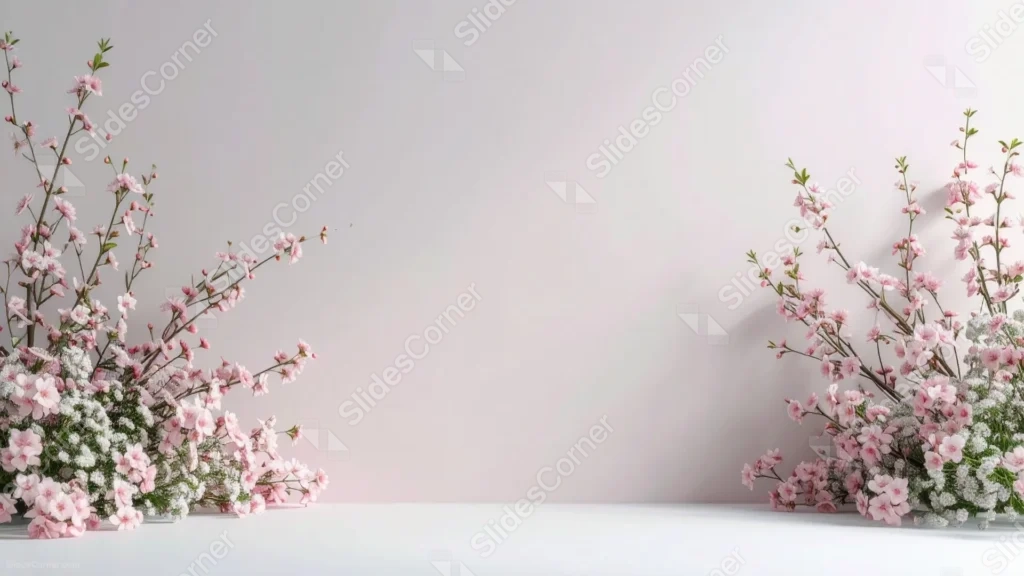
Free spring flowers background for PowerPoint with cherry blossom branches in a studio.
This spring flowers background for PowerPoint arranges tall cherry blossom branches and clouds of baby’s breath in each bottom corner of a clean, white studio wall.
Soft shadows fall behind the branches, giving the scene the calm, dimensional look of a real product photography setup.
What This Spring Flowers Background Looks Like
Slender branches covered in small pink and white blossoms rise diagonally from both bottom corners, their thin stems catching soft studio light.
Dense clusters of white baby’s breath and a few extra blossoms sit at the base of each branch bundle, resting on a plain white floor.
The wall behind fades gently from pale gray on the left to a warm off-white on the right, keeping the whole center of the frame calm and even.
Where This Spring Flowers Background For PowerPoint Fits
- Wedding, bridal, or spring event presentations
- Beauty, skincare, or product photography mockups
- Interior design or floral styling portfolios
- Any title slide wanting a clean, elegant spring look
Design Choices Behind These Blossom Branches
I set this up like a real photography studio, with soft, even light and a plain wall, so the branches read as an actual styled shoot rather than a flat illustration.
Keeping the branches confined to the bottom corners, rather than arching across the top, leaves the entire upper two-thirds of the wall open for a large headline or logo.
Adding baby’s breath at the base of each branch cluster gives the arrangement more visual weight low in the frame, balancing the airy blossoms above.
How to Apply It in PowerPoint
- Go to Design > Format Background.
- Choose Picture or texture fill, then Insert from file.
- Click Apply to All to carry it across the whole deck.
How to Apply It in Google Slides
- Open Slide > Change background.
- Click Choose image and upload the downloaded file.
- Select Done, repeating on any other slides you want to match.
Legibility Tip for This Spring Flowers Background
Keep your headline in the open wall space between the two branch clusters, using a dark gray or black font, since the wall stays neutral and even there.
Frequently Asked Questions
Is this spring flowers background free?
Yes, it’s a free download with no watermark and no account required.
Does it work in Google Slides too?
Yes, it’s a standard image file, so it applies the same way in both PowerPoint and Google Slides.
What resolution is included?
1920×1080 px, HD 16:9, suited to slides and to a desktop or phone wallpaper.
Can I use it as a wallpaper?
Yes, the 16:9 ratio matches most laptop and desktop screens.
Features at a Glance
- HD 1920×1080 resolution, 16:9 ratio
- Free download, no watermark
- Cherry blossom branches in a studio photography setup
- Clusters of baby’s breath at the base of each branch
- Wide, open wall space for text
- Works as a PowerPoint background, Google Slides background, or wallpaper
Specs
- 1920 x 1080 px · 16:9 widescreen
- JPG, high quality, no compression artefacts
- PowerPoint · Google Slides · Keynote · Canva
- No watermark · no sign-up
- Free for personal and commercial use
You can use this Elegant Spring Flowers Background For PowerPoint as a Wallpaper or use it as a background for slides.
Looking for something different? Browse all our free PPT Backgrounds, or see how to set a background in PowerPoint and Google Slides.







