



Retro Sunset Palm Background For PowerPoint With A Vaporwave Road
A free retro sunset palm background for PowerPoint with a vaporwave-style glowing road.
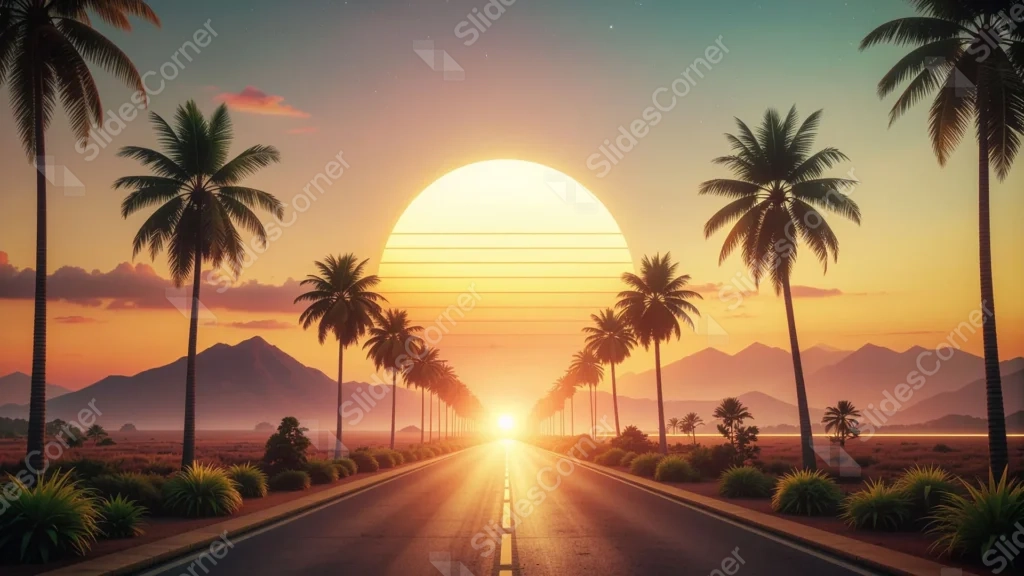
This background is for a slide that wants an open-road, synthwave kind of energy. A massive, striped orange-gold sun sits low over a straight highway lined with tall palm trees, with hazy mountains fading into a teal-to-pink sky. Free, HD, and watermark-free for PowerPoint or Google Slides.
What This Retro Sunset Palm Background Looks Like
Thin horizontal lines cut across the lower half of the giant sun, a classic vaporwave touch, while its glow spills down the centerline of the road and stretches into a bright horizon flare.
Rows of palm trees silhouette against the glow on both sides, with scrubby desert plants lining the roadside and layered mountain ridges fading into a sky that shifts from warm gold to cool teal overhead.
Where This Background Fits
It suits music and event decks, retro or 80s-themed presentations, travel and road-trip content, and any slide that wants a bold, nostalgic, cinematic mood.
Design Choices Behind This Vaporwave Sunset Road
I made the sun oversized and placed the road’s vanishing point directly beneath it, so the whole composition pulls the eye straight down the highway toward the light.
Adding the horizontal scan lines across the sun was a deliberate nod to retro synthwave art, giving an otherwise realistic sunset a distinct, stylized signature instead of a plain photographic glow.
How to Apply This Background in PowerPoint
- Open your PowerPoint presentation and go to the Design tab.
- Click Format Background, then Picture or texture fill.
- Select Insert picture from a file and choose the downloaded image.
- Click Apply to All to use it on every slide.
How to Apply This Background in Google Slides
- Download and unzip the file, then open your Google Slides presentation.
- Go to Slide, then Change background.
- Click Choose image and upload the downloaded file.
- Click Done, or apply it from the master slide for a consistent look across the deck.
Legibility Tip for This Background
Keep text in the upper sky area, away from the bright sun and road. White or deep teal text reads cleanly against the gradient sky.
FAQ
Is this retro sunset background free? Yes, it’s a free download with no watermark and no attribution required.
Does it work in Google Slides? Yes, it’s a standard image file, so it applies the same way in both Google Slides and PowerPoint.
What resolution is the file? It’s full HD at 1920×1080, so it stays sharp on any screen or projector.
Can I use this as a wallpaper? Yes, the retro sunset and glowing road make it a striking desktop background too.
Features at a Glance
- Free HD 1920×1080 download, no watermark
- Oversized striped sun with a vaporwave scan-line effect
- Palm-lined highway leading to the glowing horizon
- Layered mountains and a teal-to-gold gradient sky
- Works in PowerPoint, Google Slides, and as a wallpaper
- Suited to retro, music, and road-trip decks
Specs
- 1920 x 1080 px · 16:9 widescreen
- JPG, high quality, no compression artefacts
- PowerPoint · Google Slides · Keynote · Canva
- No watermark · no sign-up
- Free for personal and commercial use
You can use this Nostalgic Vaporwave Sunset Palm Background For PowerPoint as a Wallpaper or use it as a background for slides.
Looking for something different? Browse all our free PPT Backgrounds, or see how to set a background in PowerPoint and Google Slides.