





Orange Sunset Background For PowerPoint With A Flat Illustrated Desert
Free orange sunset background for PowerPoint with a flat, illustrated desert scene.
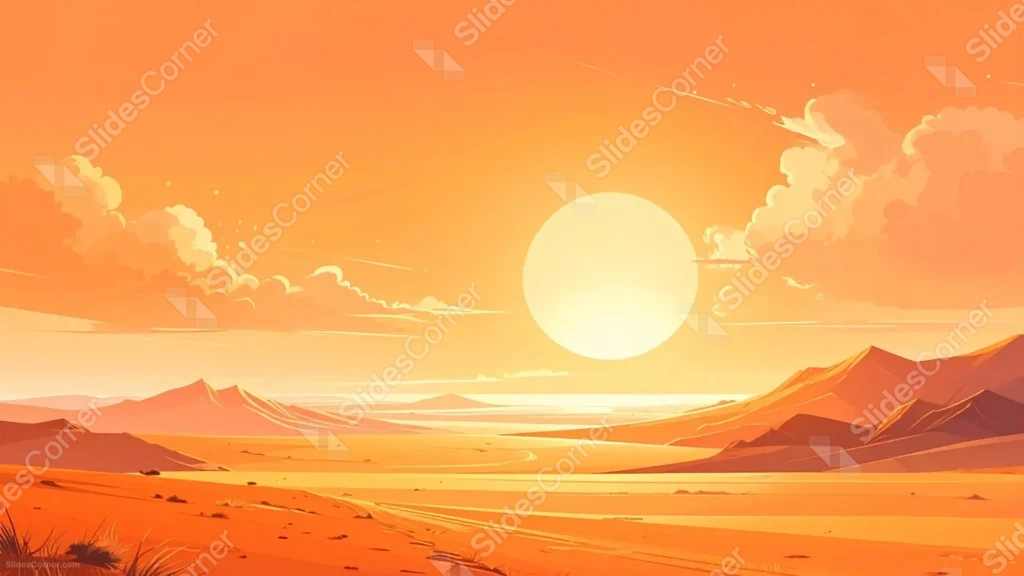
This orange sunset background for PowerPoint renders a wide desert valley in flat, vector-style color, with one enormous pale sun sitting low over distant mountains.
Puffy stylized clouds drift on either side of the sun, and a thin trail of dunes stretches across the open plain below.
What This Orange Sunset Background Looks Like
A perfectly round, near-white sun hangs at the center of the horizon, its glow fading the surrounding sky from bright yellow into deep orange at the very top of the frame.
Layered mountain silhouettes in warm rust and copper tones frame both sides of the valley, catching flat highlights along their upper ridges.
In the foreground, sandy dunes and a faint winding path lead the eye toward the glowing horizon, with a few small desert plants scattered near the bottom edge.
Where This Orange Sunset Background For PowerPoint Fits
- Travel, adventure, or desert destination presentations
- Motivational, mindfulness, or personal growth decks
- Creative, design, or illustration portfolios
- Any title slide wanting a warm, calming close
Design Choices Behind This Flat Desert Scene
I drew the sun as a single flat circle rather than adding rays or lens flare, since a plain shape reads as calmer and more graphic against the illustrated style of the rest of the piece.
Keeping the color palette to warm oranges and yellows throughout, without introducing blue or purple, makes the whole scene feel like one continuous wash of late-day heat.
I left the upper sky mostly flat and empty on purpose, since that’s the natural place for a headline to sit without competing with the mountains or sun below it.
How to Apply It in PowerPoint
- Go to Design > Format Background.
- Choose Picture or texture fill, then Insert from file.
- Click Apply to All to carry it across the whole deck.
How to Apply It in Google Slides
- Open Slide > Change background.
- Click Choose image and upload the downloaded file.
- Select Done, repeating on any other slides you want to match.
Legibility Tip for This Orange Sunset Background
Keep your headline in the upper sky, away from the sun, and use a white or deep brown font depending on how bright that part of the sky is.
Frequently Asked Questions
Is this orange sunset background free?
Yes, it’s a free download with no watermark and no account required.
Does it work in Google Slides too?
Yes, it’s a standard image file, so it applies the same way in both PowerPoint and Google Slides.
What resolution is included?
1920×1080 px, HD 16:9, suited to slides and to a desktop or phone wallpaper.
Can I use it as a wallpaper?
Yes, the 16:9 ratio matches most laptop and desktop screens.
Features at a Glance
- HD 1920×1080 resolution, 16:9 ratio
- Free download, no watermark
- Flat, vector-style illustrated desert sunset
- Large pale sun and layered mountain silhouettes
- Warm, uninterrupted orange and yellow palette
- Works as a PowerPoint background, Google Slides background, or wallpaper
Specs
- 1920 x 1080 px · 16:9 widescreen
- JPG, high quality, no compression artefacts
- PowerPoint · Google Slides · Keynote · Canva
- No watermark · no sign-up
- Free for personal and commercial use
You can use this Warm Orange Sunset Background For PowerPoint as a Wallpaper or use it as a background for slides.
Looking for something different? Browse all our free PPT Backgrounds, or see how to set a background in PowerPoint and Google Slides.








