





Retro Synthwave Background For PowerPoint With A Striped Sun
Download this free retro synthwave background for PowerPoint with a striped sunset and grid.
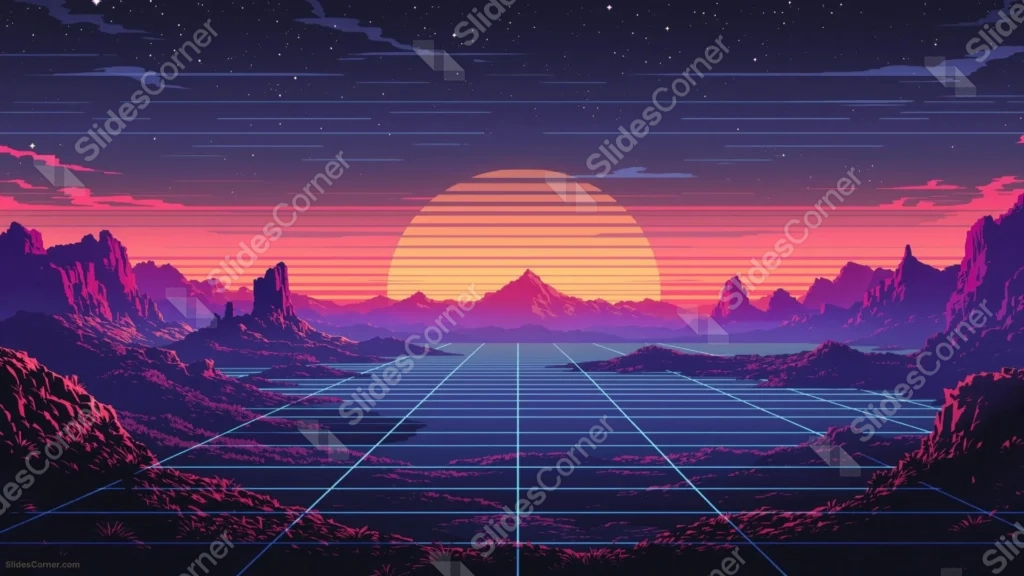
This retro synthwave background for PowerPoint bands its setting sun with thin horizontal stripes, glowing over a grid-lined horizon in classic 80s style.
Jagged purple and magenta mountains frame both sides, beneath a starry night sky streaked with drifting clouds.
What This Retro Synthwave Background Looks Like
A large striped sun glows in orange and yellow bands behind a central mountain peak, with a pink-to-purple gradient washing across the horizon.
A glowing cyan grid stretches across the entire foreground in strict perspective lines, running from the base of the mountains toward the viewer.
Jagged purple and magenta rock formations rise on both sides, while a deep navy sky scattered with stars and thin clouds fills the top of the frame.
Where This Retro Synthwave Background For PowerPoint Fits
It’s a strong fit for gaming and tech presentations, music and DJ event slides, 80s-themed decks, and any presentation wanting a bold, nostalgic retro-futuristic mood.
The dark upper sky gives bright neon-style text plenty of room to stand out.
Design Choices Behind the Striped Sun
I banded the sun with thin horizontal stripes, rather than a solid disc, so it reads instantly as a retro 80s sun rather than a plain sunset.
Laying a glowing cyan grid across the entire foreground, stretching to the horizon in strict perspective, anchors the scene in that classic synthwave digital-landscape look.
I framed the whole scene with jagged purple and magenta mountain silhouettes on both sides, so the glowing center stays the clear focal point against a busy, textured border.
How to Apply It in PowerPoint
- Go to Design > Format Background.
- Choose Picture or texture fill, then Insert from file.
- Click Apply to All to use it across the whole deck.
How to Apply It in Google Slides
- Open Slide > Change background.
- Click Choose image and upload the downloaded file.
- Select Done, repeating on any other slides you want to match.
Legibility Tip for This Retro Synthwave Background
Place your text in the dark starry sky above the mountains, using white, cyan, or hot pink type to match the retro color scheme.
Frequently Asked Questions
Is this retro synthwave background free?
Yes, it’s a free download with no watermark and no account required.
Does it work in Google Slides too?
Yes, it’s a standard image file, so it applies the same way in both PowerPoint and Google Slides.
What resolution is included?
1920×1080 px, HD 16:9, suited to slides and to a desktop or phone wallpaper.
Can I use it as a wallpaper?
Yes, the 16:9 ratio matches most laptop and desktop screens.
Features at a Glance
- HD 1920×1080 resolution, 16:9 ratio
- Free download, no watermark
- Striped retro sun glowing behind a central peak
- Glowing cyan grid stretching across the foreground
- Jagged purple and magenta mountains framing both sides
- Works as a PowerPoint background, Google Slides background, or wallpaper
Specs
- 1920 x 1080 px · 16:9 widescreen
- JPG, high quality, no compression artefacts
- PowerPoint · Google Slides · Keynote · Canva
- No watermark · no sign-up
- Free for personal and commercial use
You can use this Neon Retro Synthwave Background For PowerPoint as a Wallpaper or use it as a background for slides.
Looking for something different? Browse all our free PPT Backgrounds, or see how to set a background in PowerPoint and Google Slides.