



Nature Landscape Background For PowerPoint With Golden Sunrise Fog
Free nature landscape background for PowerPoint with golden sunrise light, misty trees, and a wild meadow, HD 16:9.
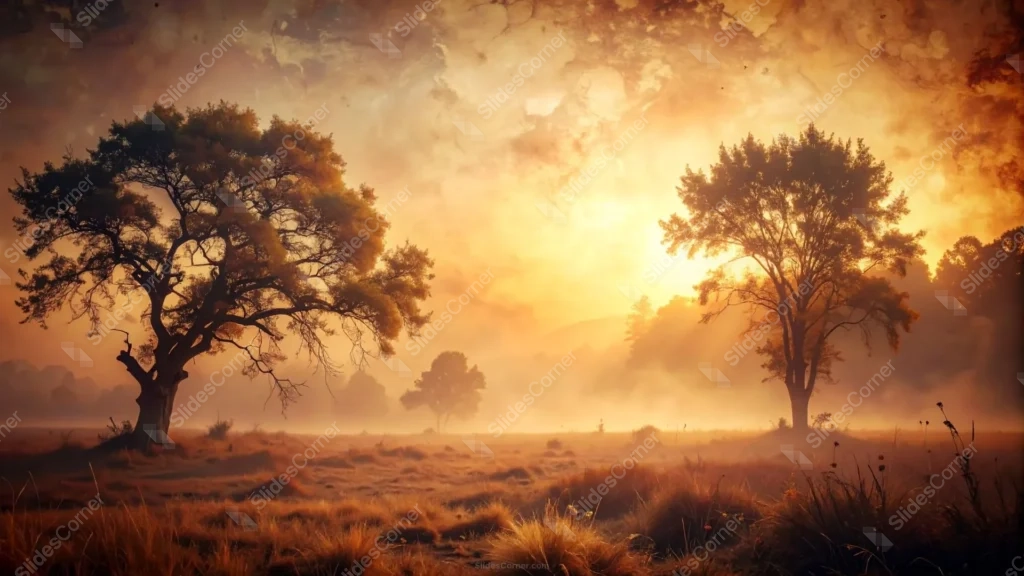
This nature landscape background for PowerPoint shows a wild meadow at sunrise, wrapped in gold light and drifting fog, with two silhouetted trees anchoring the scene.
The sun sits low behind a haze of clouds at center, its light diffusing outward into a soft, almost painterly glow that fills most of the sky.
What This Nature Landscape Background Looks Like
A large, gnarled tree stands in the left foreground, its bare lower branches and full crown rendered in near-silhouette against the glow. A second, smaller tree stands further back on the right, catching more direct light through its leaves.
Between them, a faint third tree and low hills fade into the mist, giving the scene real depth instead of a flat backdrop.
The foreground is dry, golden meadow grass and wild seed heads, textured enough to feel like a real field caught at first light.
Where This Landscape Background For PowerPoint Fits
It suits environmental and conservation presentations, agriculture and farming decks, outdoor or travel brand pitches, wellness and mindfulness content, and any keynote that wants a calm, grounded opening slide.
The open sky at center also works well for a title, quote, or company name over the haze.
Design Choices Behind the Light and Fog
I built the whole palette around a single warm gold, letting it shift from deep amber in the shadows to near-white where the sun sits, rather than mixing in unrelated colors.
The two trees are deliberately unequal in size and placement. A perfectly symmetrical pair would feel staged, while this asymmetry reads as a real place, not a rendered stock scene.
I let the fog soften the middle distance heavily, so the eye moves from crisp foreground grass to a hazy, glowing center, which is exactly where text will land best.
How to Apply It in PowerPoint
- Go to Design > Format Background.
- Choose Picture or texture fill, then Insert from file.
- Click Apply to All, or leave it on a single opening slide.
How to Apply It in Google Slides
- Open Slide > Change background.
- Click Choose image and upload the downloaded file.
- Select Done, repeating on each slide you want to match.
Legibility Tip for This Landscape Background
Place text in the hazy sky between the two trees, where the fog has already softened the detail. White or cream text holds up well against the glow.
Frequently Asked Questions
Is this nature landscape background free?
Yes, it’s a free download with no watermark and no account required.
Does it work in Google Slides too?
Yes, it’s a standard image file, so it applies the same way in both PowerPoint and Google Slides.
What resolution is included?
1920×1080 px, HD 16:9, suited to slides and to a desktop or phone wallpaper.
Can I use it as a wallpaper?
Yes, the 16:9 ratio matches most laptop and desktop screens.
Features at a Glance
- HD 1920×1080 resolution, 16:9 ratio
- Free download, no watermark
- Golden sunrise light diffused through fog and clouds
- Two silhouetted trees framing an open, misty meadow
- Dry golden grass and wild seed heads in the foreground
- Works as a PowerPoint background, Google Slides background, or wallpaper
Specs
- 1920 x 1080 px · 16:9 widescreen
- JPG, high quality, no compression artefacts
- PowerPoint · Google Slides · Keynote · Canva
- No watermark · no sign-up
- Free for personal and commercial use
You can use this Hazy Golden Sunrise Meadow Background for Nature-Inspired Presentations as a Wallpaper or use it as a background for slides.
Looking for something different? Browse all our free PPT Backgrounds, or see how to set a background in PowerPoint and Google Slides.