



Floral Background For PowerPoint With Colorful Daisies On Cream
Download this free floral background for PowerPoint with colorful daisies on cream paper.
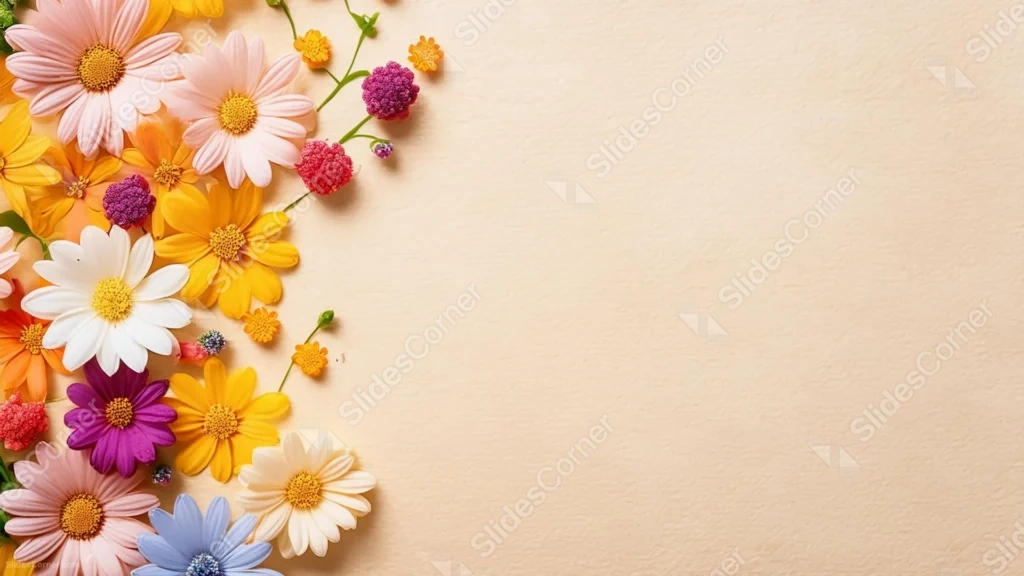
This floral background for PowerPoint clusters colorful daisies and small pom-pom blooms along the entire left edge, set against a textured cream paper surface.
Unlike a ring framing an open center, the flowers run edge to edge down the left side, leaving the whole right two-thirds of the frame clear.
What This Floral Background Looks Like
Pink, yellow, white, purple, and pale blue daisies overlap in a dense cluster along the left, with a few small green stems and buds trailing toward the center.
Tiny pom-pom flowers in magenta and orange are tucked between the larger daisies, adding pops of saturated color.
The right two-thirds of the frame is a soft, visibly textured cream paper, completely free of any petals or stems.
Where This Floral Background For PowerPoint Fits
- Spring, garden, or floral brand presentations
- Invitation or greeting card style slides
- Wellness or lifestyle decks wanting a cheerful accent
- Any title slide needing a wide, open space for text
Design Choices Behind the Daisy Cluster
I pushed all the flowers to the left edge, rather than framing an open center on all sides, so there’s one large, uninterrupted space for a full paragraph of text.
Mixing several distinct colors, pink, yellow, white, purple, and blue, keeps the cluster feeling like a real gathered bouquet instead of a single-color pattern.
Using a textured cream paper instead of plain white gives the empty space a bit of warmth and grain, so it doesn’t feel sterile.
How to Apply It in PowerPoint
- Go to Design > Format Background.
- Choose Picture or texture fill, then Insert from file.
- Click Apply to All to carry it across the whole deck.
How to Apply It in Google Slides
- Open Slide > Change background.
- Click Choose image and upload the downloaded file.
- Select Done, repeating on any other slides you want to match.
Legibility Tip for This Floral Background
Keep text in the open cream area on the right, using a dark brown or charcoal font so it stands out clearly against the light paper.
Frequently Asked Questions
Is this floral background free?
Yes, it’s a free download with no watermark and no account required.
Does it work in Google Slides too?
Yes, it’s a standard image file, so it applies the same way in both PowerPoint and Google Slides.
What resolution is included?
1920×1080 px, HD 16:9, suited to slides and to a desktop or phone wallpaper.
Can I use it as a wallpaper?
Yes, the 16:9 ratio matches most laptop and desktop screens.
Features at a Glance
- HD 1920×1080 resolution, 16:9 ratio
- Free download, no watermark
- Colorful daisies and pom-pom blooms along the left edge
- Textured cream paper background
- Wide, fully open right side for text
- Works as a PowerPoint background, Google Slides background, or wallpaper
Specs
- 1920 x 1080 px · 16:9 widescreen
- JPG, high quality, no compression artefacts
- PowerPoint · Google Slides · Keynote · Canva
- No watermark · no sign-up
- Free for personal and commercial use
You can use this Cheerful Floral Background For PowerPoint as a Wallpaper or use it as a background for slides.
Looking for something different? Browse all our free PPT Backgrounds, or see how to set a background in PowerPoint and Google Slides.








