





Botanical Background for PowerPoint with Tropical Leaves
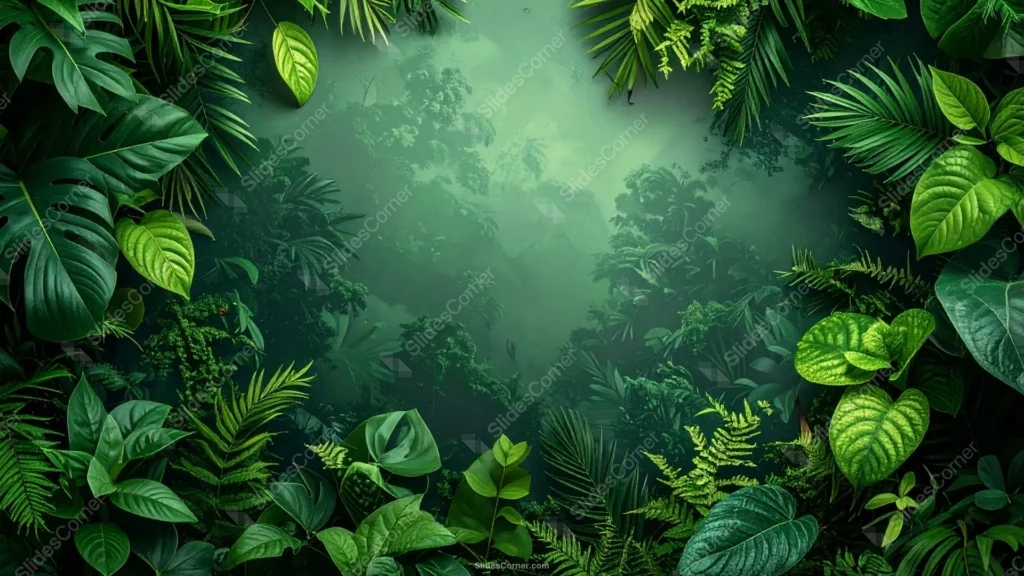
Free botanical background for PowerPoint with a tropical leaf frame and misty jungle depth.
This botanical background for PowerPoint frames the slide with dense, overlapping tropical leaves, monstera, palm fronds, ferns, and broad philodendron-type leaves in every shade of green from near-black emerald to bright lime. The center opens into a hazy, receding jungle, like looking through a clearing into the forest beyond.
What sets this one apart from a flat leaf border is the depth. The foliage framing the edges is sharp and detailed, veins and texture clearly visible, while the middle distance softens into mist and shadow, with a faint beam of light falling through the canopy.
That contrast between crisp foreground leaves and a soft, atmospheric background is what makes the whole image feel like a real place rather than a flat pattern repeated around a rectangle.
What This Botanical Background for PowerPoint Fits
It suits sustainability and environmental presentations, travel and ecotourism decks, plant-based product launches, wellness or spa branding, and any nature, biology, or conservation topic that wants an immersive feel.
Because the center reads as an actual space rather than a texture, it also works well for a title slide meant to set a mood before the content starts, rather than a background you’ll see repeated on every slide.
Design Choices Behind the Layered Jungle Frame
I kept the leaf detail concentrated at the edges and let it thin out gradually toward the middle, rather than stopping abruptly. A hard edge between “leaves” and “background” would have looked like a sticker; the gradual falloff reads as actual depth of field.
The palette stays entirely within green, from a near-black #0F2818 in the shadowed corners to a bright, sunlit #8AC24A on the lit leaves. No other hue interrupts it, which keeps the whole image feeling like one continuous environment instead of a decorated border.
That soft light beam in the center isn’t just atmosphere. It’s what gives the middle of the slide enough brightness to hold dark text without a solid box behind it, even though the rest of the image runs quite dark.
How to Apply It in PowerPoint
- Open your slide, go to Design > Format Background.
- Choose Picture or texture fill, then Insert from file and select the downloaded image.
- Click Apply to All for the whole deck, or use it on a single title or opening slide.
How to Apply It in Google Slides
- Open Slide > Change background.
- Click Choose image and upload the file from your computer.
- Select Done. Repeat on each slide you want to match, since Slides sets backgrounds one at a time.
Legibility Tip for This Botanical Background
Keep text inside the lit center, where the mist and light beam brighten the frame. White or pale text reads best there; avoid placing text over the darker leaf corners, since the detail and shadow make it hard to read against.
Frequently Asked Questions
Is this botanical background for PowerPoint free?
Yes, it’s a free download with no watermark and no account required.
Does it work in Google Slides?
Yes. It’s a standard image file, so it uploads and applies the same way it does in PowerPoint.
What resolution is included?
1920×1080 px, HD 16:9, suited to slides and to a desktop or phone wallpaper.
Is it only for nature topics?
No. The calm, grounded green tone also works for wellness, sustainability, travel, or any brand that wants a natural feel.
Features at a Glance
- HD 1920×1080 resolution, 16:9 ratio
- Free download, no watermark
- Dense tropical leaf frame in layered shades of green
- Soft, misty jungle depth with a natural light beam in the center
- Bright, legible middle for titles and text
- Works as a PowerPoint background, Google Slides background, or wallpaper
Specs
- 1920 x 1080 px · 16:9 widescreen
- JPG, high quality, no compression artefacts
- PowerPoint · Google Slides · Keynote · Canva
- No watermark · no sign-up
- Free for personal and commercial use
You can use this Lush Tropical Botanical Background for Nature PowerPoint Slides as a Wallpaper or use it as a background for slides.
Looking for something different? Browse all our free PPT Backgrounds, or see how to set a background in PowerPoint and Google Slides.








