





Blue Silk Background For PowerPoint With A Sheer Fabric Frame
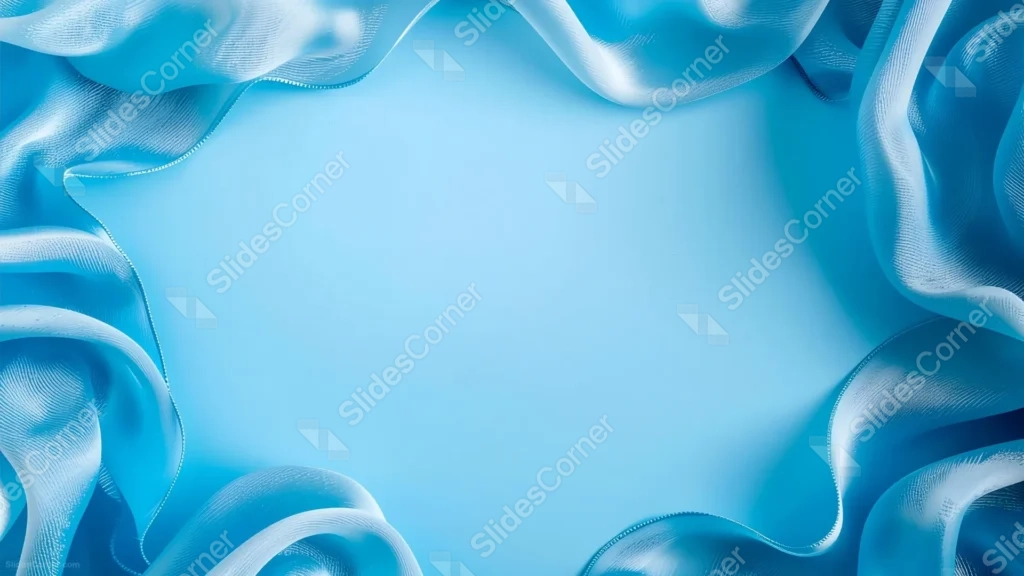
A blue silk background for PowerPoint with sheer, wave-edged fabric framing a clean, open light blue center.
This background is for a slide that needs real breathing room in the middle without losing texture at the edges. Sheer blue silk ribbons curl and fold around all four sides of the frame, their fine woven mesh catching the light, while the entire center stays a clean, solid pale blue. Free, HD, and watermark-free for PowerPoint or Google Slides.
What This Blue Silk Background Looks Like
Thin, translucent silk ribbons twist and overlap along the top, both sides, and the bottom corners, each one showing a delicate visible weave where the light passes through it. The fabric ranges from deep sapphire in the shadowed folds to almost white where it catches direct light.
Inside that border, the background drops to a flat, quiet light blue with no texture at all, like the calm center of a picture frame made entirely of fabric.
Where This Background Fits
This works well for wedding and event invitations, elegant business or wellness decks, baby shower or gender-reveal slides in blue, or any title screen that wants a soft frame effect around a clear message.
Design Choices Behind This Sheer Fabric Frame
I built this as a frame rather than a full-bleed fabric shot on purpose. Most silk backgrounds fill the whole image with folds; here, pushing every ribbon out to the edges and leaving the center completely flat gives you a genuinely empty canvas instead of gaps between waves.
Keeping the fabric sheer rather than opaque satin was deliberate too. Letting light pass through the weave keeps the border feeling light and airy instead of heavy, so it frames the center without visually weighing the slide down.
How to Apply This Background in PowerPoint
- Download and unzip the file, then open your PowerPoint presentation.
- Go to the Design tab and click Format Background.
- Choose Picture or texture fill, then Insert picture from a file, and select the downloaded image.
- Click Apply to All to use it across the whole deck, or leave it on a single slide.
How to Apply This Background in Google Slides
- Open your presentation and go to Slide, then Change background.
- Click Choose image and upload the downloaded file.
- Click Done to apply it to the current slide.
- To apply it across every slide, make the change from the master theme instead.
Legibility Tip for This Background
Keep your text inside the plain center, well clear of the fabric border. Dark navy or white text both read clearly against the flat light blue, and this background has enough open space to hold a full paragraph if needed.
FAQ
Is this blue silk background free? Yes, it’s a free download with no watermark and no attribution required.
Does it work in Google Slides? Yes, it uploads directly as a custom background image, no conversion needed.
What resolution is the file? It’s full HD at 1920×1080, so it stays sharp on any screen or projector.
Can I use this as a wallpaper? Yes, the calm center and soft fabric border work well as a desktop background too.
Features at a Glance
- Free HD 1920×1080 download, no watermark
- Sheer blue silk ribbons framing all four edges
- Visible woven mesh texture in the fabric
- Completely flat, open light blue center
- Works in PowerPoint, Google Slides, and as a wallpaper
- Elegant, airy mood suited to weddings and formal announcements
Specs
- 1920 x 1080 px · 16:9 widescreen
- JPG, high quality, no compression artefacts
- PowerPoint · Google Slides · Keynote · Canva
- No watermark · no sign-up
- Free for personal and commercial use
You can use this Elegant Blue Silk Background Framed By Sheer Flowing Fabric For Presentations as a Wallpaper or use it as a background for slides.
Looking for something different? Browse all our free PPT Backgrounds, or see how to set a background in PowerPoint and Google Slides.








