



Pink Rose Petals Background For Slides With A Soft Open Center
Download this free pink rose petals background for Slides with a soft, clean open center.
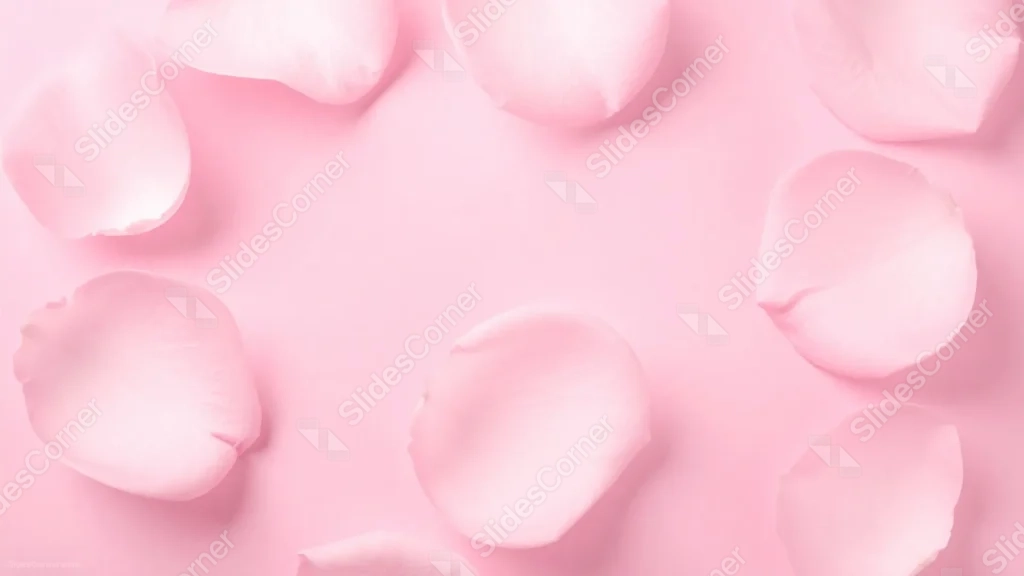
This pink rose petals background for Slides scatters real rose petals loosely around the edges of a matching pink surface, leaving the center completely open.
Every petal and the background sit in nearly the same soft pink, so the shapes read through gentle shadow rather than color contrast.
What This Pink Rose Petals Background Looks Like
Photographed rose petals, each with a slight natural curl and soft shadow beneath, are arranged in a loose, uneven ring around the frame.
The pink of the petals matches the pink of the surface almost exactly, so the piece reads as tonal and quiet rather than high-contrast.
A wide, plain pink oval sits untouched in the middle, fully open for text.
Where This Pink Rose Petals Background For Slides Fits
- Wedding, bridal shower, or Valentine’s Day slides
- Beauty, skincare, or spa presentations
- Soft, minimal brand decks
- Any title slide wanting a gentle, romantic tone
Design Choices Behind the Tonal Petals
I matched the petal color to the background almost exactly, rather than using a deeper rose or contrasting hue, so the piece feels calm instead of decorative.
Leaving the petals scattered unevenly, instead of arranging them in a perfect symmetrical ring, keeps the composition feeling like a real photograph rather than a designed pattern.
The wide plain center was the whole point of this shot: I wanted a background that could hold a full paragraph of text without a single petal in the way.
How to Apply It in PowerPoint
- Go to Design > Format Background.
- Choose Picture or texture fill, then Insert from file.
- Click Apply to All to carry it across the whole deck.
How to Apply It in Google Slides
- Open Slide > Change background.
- Click Choose image and upload the downloaded file.
- Select Done, repeating on any other slides you want to match.
Legibility Tip for This Petals Background
Because the tones are so close together, use a deep rose, burgundy, or charcoal font in the open center so your text doesn’t wash out against the pale pink.
Frequently Asked Questions
Is this pink rose petals background free?
Yes, it’s a free download with no watermark and no account required.
Does it work in PowerPoint too?
Yes, it’s a standard image file, so it applies the same way in both Google Slides and PowerPoint.
What resolution is included?
1920×1080 px, HD 16:9, suited to slides and to a desktop or phone wallpaper.
Can I use it as a wallpaper?
Yes, the 16:9 ratio matches most laptop and desktop screens.
Features at a Glance
- HD 1920×1080 resolution, 16:9 ratio
- Free download, no watermark
- Real photographed rose petals in matching pink tones
- Soft, uneven petal ring around the frame
- Wide, plain open center for text
- Works as a Google Slides background, PowerPoint background, or wallpaper
Specs
- 1920 x 1080 px · 16:9 widescreen
- JPG, high quality, no compression artefacts
- PowerPoint · Google Slides · Keynote · Canva
- No watermark · no sign-up
- Free for personal and commercial use
You can use this Delicate Pink Rose Petals Background For Slides as a Wallpaper or use it as a background for slides.
Looking for something different? Browse all our free PPT Backgrounds, or see how to set a background in PowerPoint and Google Slides.