





Abstract Oil Paint Background For PowerPoint With A Warm Sunburst Center
Download this free abstract oil paint background for PowerPoint with a warm sunburst center.
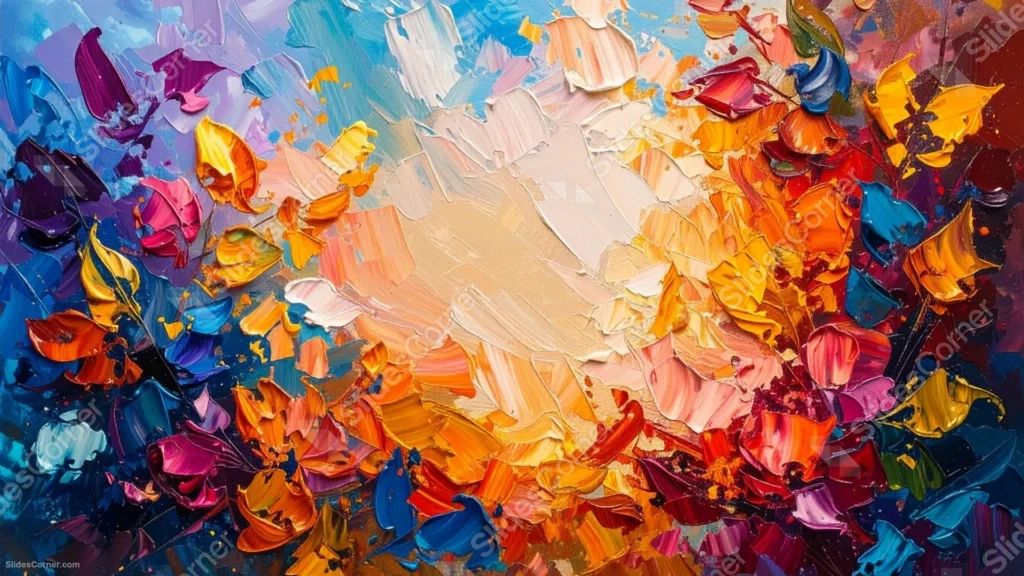
This abstract oil paint background for PowerPoint shifts from cool blue-violet corners into a warm cream-orange sunburst at the center, all built from heavy palette-knife strokes.
Dense clusters of orange, red, pink, and teal petal-like strokes press in from every edge, leaving the lighter middle to read as a glow rather than empty space.
What This Abstract Oil Paint Background Looks Like
Thick, ridged strokes of paint build up abstract floral and leaf shapes across the entire frame, each one catching real shadow along its raised edge.
The palette runs cool at the corners, blues and violets, then warms steadily toward the center into cream, peach, and orange, like light breaking through.
Deep reds, magentas, and a few sparks of teal are worked into the lower half, keeping the piece from settling into just warm or just cool tones.
Where This Abstract Oil Paint Background For PowerPoint Fits
- Creative and art-department presentations
- Gallery openings, portfolio decks, and design showcases
- Wellness or inspirational talks wanting warmth and energy
- Title slides that benefit from a bright, glowing focal point
Design Choices Behind the Warm Sunburst Center
I built this piece around a radial shift, cool blue-violet at the corners moving into a warm cream-orange center, so the eye travels inward on its own without any added arrows or shapes.
I kept the middle lighter in value and less crowded than the floral bursts around it, so the glow reads as light rather than just another patch of paint.
Every ridge in the impasto is genuine, laid down with a palette knife rather than smoothed out digitally, so the texture still holds up at full screen size.
How to Apply It in PowerPoint
- Go to Design > Format Background.
- Choose Picture or texture fill, then Insert from file.
- Click Apply to All to use it across the whole deck.
How to Apply It in Google Slides
- Open Slide > Change background.
- Click Choose image and upload the downloaded file.
- Select Done, repeating on any other slides you want to match.
Legibility Tip for This Abstract Oil Paint Background
Place text in the cream-orange glow at the center, using a dark brown or black font so it stays readable against the lighter tones there.
Frequently Asked Questions
Is this abstract oil paint background free?
Yes, it’s a free download with no watermark and no account required.
Does it work in Google Slides too?
Yes, it’s a standard image file, so it applies the same way in both PowerPoint and Google Slides.
What resolution is included?
1920×1080 px, HD 16:9, suited to slides and to a desktop or phone wallpaper.
Can I use it as a wallpaper?
Yes, the 16:9 ratio matches most laptop and desktop screens.
Features at a Glance
- HD 1920×1080 resolution, 16:9 ratio
- Free download, no watermark
- Genuine palette-knife impasto texture throughout
- Cool-to-warm radial color shift, blue-violet to cream-orange
- Bright, glowing center suited to a title and subtitle
- Works as a PowerPoint background, Google Slides background, or wallpaper
Specs
- 1920 x 1080 px · 16:9 widescreen
- JPG, high quality, no compression artefacts
- PowerPoint · Google Slides · Keynote · Canva
- No watermark · no sign-up
- Free for personal and commercial use
You can use this Radiant Abstract Oil Paint Background For PowerPoint Presentations as a Wallpaper or use it as a background for slides.
Looking for something different? Browse all our free PPT Backgrounds, or see how to set a background in PowerPoint and Google Slides.








