
You might also like:






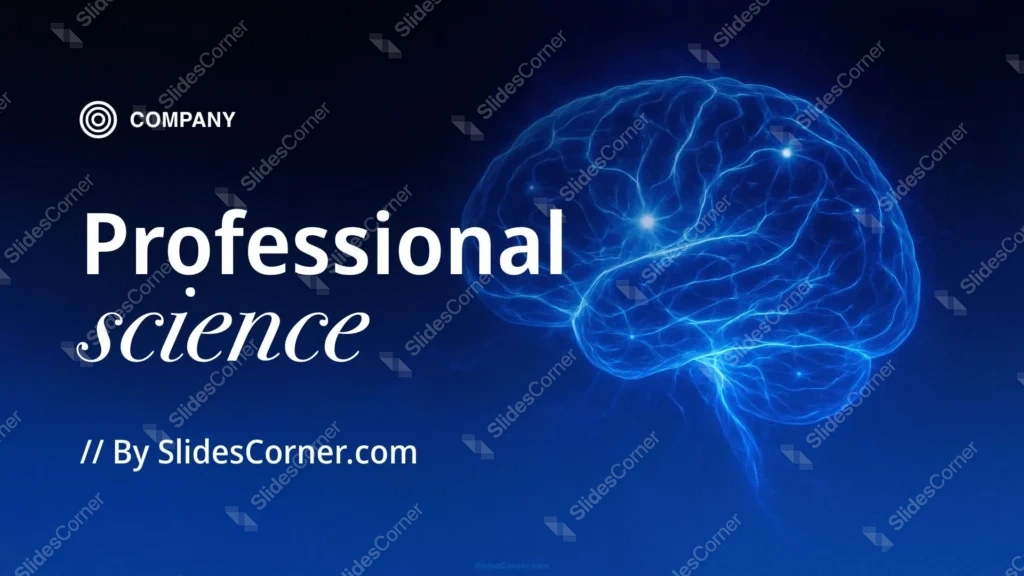
I made this professional science ppt background for the moment when a slide needs to feel intelligent before anyone reads a word. The frame is a deep navy blue that sinks into near-black at the edges, and a single human brain sits in the center, lit from within like cool bioluminescence. The glow is electric blue, almost cyan along the neural folds, so the organ reads as alive and active rather than clinical or flat.
What This Professional Science PPT Background Looks Like
The composition is deliberately quiet. One subject, centered, surrounded by darkness. I let the brain’s light fall off gradually into the gradient, so no hard line fights your eye. The blue runs from a saturated mid-tone on the brain itself to a muted, dusky navy in the corners. That corner darkness is doing a job. It’s empty space I reserved for your title and bullet text.
Why I Designed the Brain to Glow Against Near-Black
Blue carries a specific weight in science and medicine. It reads as trust, focus, and depth, and it survives projector light without turning muddy. I pushed the background toward black on purpose. A glowing subject only looks luminous when the field around it is genuinely dark, so I traded brightness in the corners to make the brain feel like it’s emitting light instead of just being colored blue.
Contrast was the real design problem here. A centered, bright subject can wreck legibility the second you drop text on top of it. I kept the upper and lower thirds dim and uncluttered for that reason, so white or pale-blue type lands cleanly without a glow halo bleeding through the letters. I built this for content that leans on one strong image: a neuroscience lecture, a cognitive-science seminar, an AI or machine-learning talk, a medical research readout, a biology unit. Anywhere the brain is the metaphor, this slide gives you a focal point without stealing the room’s attention from you.
Where This Science Slide Background Works Best
The dark field suits darkened lecture halls and recorded webinars, where a bright white slide tends to glare on camera. It holds up as a title slide, a section divider, or a closing frame. It also works as a desktop wallpaper if you like a moody, science-forward screen.
How to Apply It in PowerPoint and Google Slides
In PowerPoint, open Design, click Format Background, choose Picture or texture fill, then Insert and select the downloaded file. Tick “Apply to All” to share it across every slide. Keep your text boxes in the top or bottom third, away from the glow.
In Google Slides, open the Slide menu, click Change background, choose Choose image, upload the file, and select Add to theme to apply it across the whole deck. Set your text color to white or a very light blue for the cleanest read.
One readability tip from experience: if a headline has to cross the center, drop a soft dark rectangle behind it at low opacity. The brain’s glow stays visible underneath, and your words stay sharp on top.
What’s Included
- One HD 16:9 background at full presentation resolution
- A dark navy-to-black blue gradient with a luminescent human brain
- Reserved dark space in the corners for PowerPoint and Slides text
- No watermark and no attribution required
- Free download for personal and commercial decks
- Compatible with PowerPoint, Google Slides, and Keynote
- Doubles as a presentation title slide, divider, or wallpaper
- Cool-blue palette tuned for science, medical, and tech topics
- Centered composition that keeps the focal point obvious
- Projector-friendly contrast for darkened rooms
Professional Science PPT Background FAQ
Is this science background free?
Yes. You can download and use it at no cost, in personal and commercial presentations, with no watermark.
Does it work in Google Slides?
It does. Upload it through Change background, and it applies to a single slide or the entire deck.
What resolution is the file?
It’s a high-definition 16:9 image, sized for full-screen slides and large displays without blurring.
Can I use it as a wallpaper?
Yes. The 16:9 ratio fits most monitors, so it works as a desktop background as well as a slide.
Specs
- 1920 x 1080 px · 16:9 widescreen
- JPG, high quality, no compression artefacts
- PowerPoint · Google Slides · Keynote · Canva
- No watermark · no sign-up
- Free for personal and commercial use
You can use this Luminous Blue Brain Background for Science and Research Presentations as a Wallpaper or use it as a background for slides.
Looking for something different? Browse all our free PPT Backgrounds, or see how to set a background in PowerPoint and Google Slides.