You might also like:





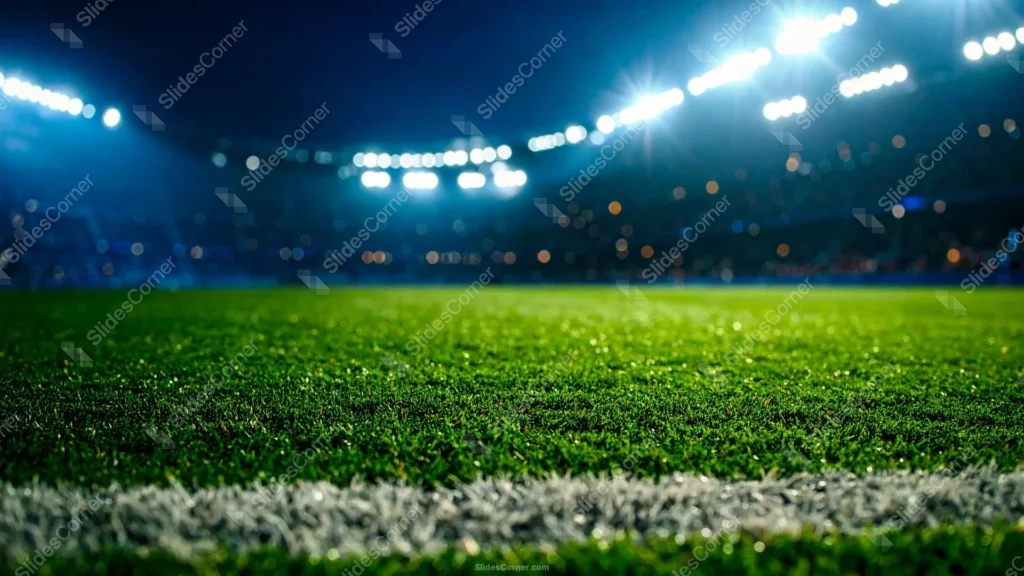
This soccer background for PowerPoint puts you pitch-side under the lights, at the exact moment before kickoff. The foreground is sharp stadium grass with a painted white line running across the bottom, and everything above it melts into a soft blur: banks of floodlights, warm and cool bokeh from the stands, and a deep blue night sky. It’s a real photograph, not a flat graphic, so it carries the atmosphere of a live match onto your slides in a way illustration can’t quite fake.
I chose a shallow depth of field on purpose. The crisp blades of grass at the bottom pull your eye in, and the dreamy out-of-focus lights up top do two jobs at once: they set the mood and — more usefully — they give you a naturally darker, calmer zone in the upper third where a headline can breathe. The green-to-blue color story is the classic language of night football, and I let the white touchline anchor the frame so the composition feels grounded instead of floating.
What this soccer background for PowerPoint is
This is a free, high-definition 16:9 background with no watermark, sized for slides and screens. It works as a title slide, a section divider, a sports-quiz opener, or a full wallpaper for a laptop or phone. It’s built for PowerPoint, Google Slides, and Keynote, and exports cleanly to a JPG you can set as a desktop image.
Where I pictured you using it
I concept’d this stadium soccer background for content that wants real match-day energy rather than flat graphics. It fits:
- Sports club and academy presentation decks and welcome slides
- Match previews, team talks, and season-kickoff PPT openers
- Fantasy-league, prediction, and tournament bracket decks
- Coaching sessions, P.E. lessons, and youth training material
- Sports-bar and venue promos for live screenings
- Watch-party invites and fan-event title Slides
- Sponsorship pitches for football teams and leagues
- Trivia nights and sports-quiz PowerPoint rounds
- A cinematic stadium wallpaper for laptop or phone
- Any Background where a photographic, in-the-moment feel beats illustration
The design decision I care about most: readability on a photo
A photographic background is trickier for text than a flat color, so here’s how I’d place type. The blurred upper third, where the sky darkens toward the top corners, is your friend — drop a bold white headline there and it reads instantly. Avoid setting text directly over the bright floodlight cluster or the busy bokeh; the contrast is too uneven and words get lost. If you need text lower down over the grass, add a subtle dark gradient or a semi-transparent shadow box behind it so the letters don’t fight the green texture. White and pale yellow are your safest text colors here; thin dark type is the one thing that will disappear.
How to apply this soccer background for PowerPoint and Google Slides
In PowerPoint: open your deck, go to Design → Format Background → Picture or texture fill → Insert → From a File, and select the JPG. Choose Apply to All for a match-day theme across the deck, or keep it on the title slide only. Add a text box in the darker upper area and set the font to white so it stands out.
In Google Slides: open Slide → Change background, click Choose image, upload the JPG, then pick Add to theme to apply it deck-wide or Done for a single slide. Insert a text box, move it into the blurred sky zone, and switch the text color to white under Format → Format options.
Readability tip that saves most photo decks: never trust text straight on a busy image. A 30–40% black overlay behind your headline costs you nothing visually and makes every word legible from the back of the room.
FAQ
Is this soccer background for PowerPoint free?
Yes. It’s a free download with no watermark, ready for personal and everyday presentation projects.
Does it work in Google Slides?
Yes. Upload the JPG through Slide → Change background. It also works in PowerPoint and Keynote the same way.
What resolution is it?
It’s HD 16:9, sized for widescreen slides and standard laptop and monitor screens.
Can I use it as a wallpaper?
Absolutely. Set the JPG as your desktop or phone wallpaper for a stadium-at-night look between decks.
Specs
- 1920 x 1080 px · 16:9 widescreen
- JPG, high quality, no compression artefacts
- PowerPoint · Google Slides · Keynote · Canva
- No watermark · no sign-up
- Free for personal and commercial use
You can use this Atmospheric Night Stadium Soccer Background for Match-Day PowerPoint Slides as a Wallpaper or use it as a background for slides.
Looking for something different? Browse all our free PPT Backgrounds, or see how to set a background in PowerPoint and Google Slides.