





Floral Background For PowerPoint With A Pastel Dahlia Border
Free floral background for PowerPoint with a pastel dahlia and rose border.
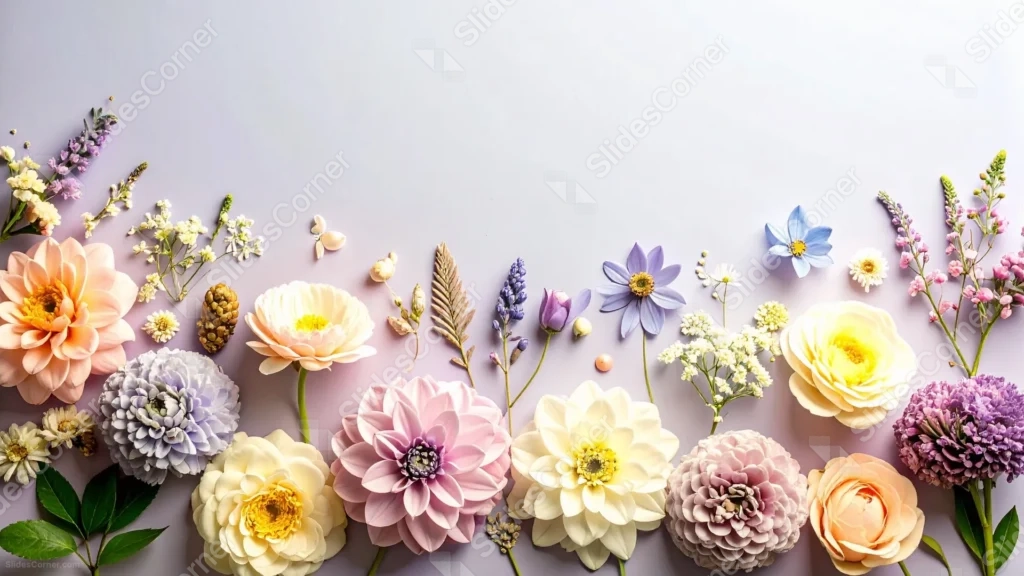
This floral background for PowerPoint lines the bottom edge with full pastel dahlias, roses, and delicate wildflowers, laid flat against a clean white backdrop.
Each bloom sits at its own angle, with sprigs of baby’s breath and a single dried fern leaf filling the small gaps between them.
What This Floral Background Looks Like
Large dahlias in peach, cream, and pale pink anchor the row, their tightly layered petals catching soft, even studio light.
Smaller blooms, including a lavender daisy, a blue flower, and clusters of baby’s breath, fill the spaces between the larger flowers without ever crowding them.
The entire top two-thirds of the frame stays plain white, giving the flower border below plenty of room to breathe.
Where This Floral Background For PowerPoint Fits
- Wedding, bridal shower, or floral shop presentations
- Beauty, spa, or botanical brand decks
- Invitations, greeting cards, or thank-you slides
- Any title slide wanting a clean, elegant floral border
Design Choices Behind This Dahlia Border
I lined every flower along the bottom edge only, rather than framing all four sides, so the top of the slide stays completely free for a full headline or paragraph.
Choosing dahlias as the anchor flower, rather than roses alone, gave me larger, more textured blooms that read clearly even at a distance.
Keeping every flower true to its natural color, without adding artificial tints, lets the pastel palette feel soft and organic rather than overly styled.
How to Apply It in PowerPoint
- Go to Design > Format Background.
- Choose Picture or texture fill, then Insert from file.
- Click Apply to All to carry it across the whole deck.
How to Apply It in Google Slides
- Open Slide > Change background.
- Click Choose image and upload the downloaded file.
- Select Done, repeating on any other slides you want to match.
Legibility Tip for This Floral Background
Keep your headline in the plain white upper area and use a dark plum or charcoal font, since that space stays completely free of flowers.
Frequently Asked Questions
Is this floral background free?
Yes, it’s a free download with no watermark and no account required.
Does it work in Google Slides too?
Yes, it’s a standard image file, so it applies the same way in both PowerPoint and Google Slides.
What resolution is included?
1920×1080 px, HD 16:9, suited to slides and to a desktop or phone wallpaper.
Can I use it as a wallpaper?
Yes, the 16:9 ratio matches most laptop and desktop screens.
Features at a Glance
- HD 1920×1080 resolution, 16:9 ratio
- Free download, no watermark
- Pastel dahlias, roses, and wildflowers in a bottom border
- Clean white studio background
- Wide, open upper area for text
- Works as a PowerPoint background, Google Slides background, or wallpaper
Specs
- 1920 x 1080 px · 16:9 widescreen
- JPG, high quality, no compression artefacts
- PowerPoint · Google Slides · Keynote · Canva
- No watermark · no sign-up
- Free for personal and commercial use
You can use this Elegant Floral Background For PowerPoint as a Wallpaper or use it as a background for slides.
Looking for something different? Browse all our free PPT Backgrounds, or see how to set a background in PowerPoint and Google Slides.








