






Elegant Fantasy Background For PowerPoint With A Palace Staircase
Free elegant fantasy background for PowerPoint with gold columns, candelabras, and a glowing staircase.
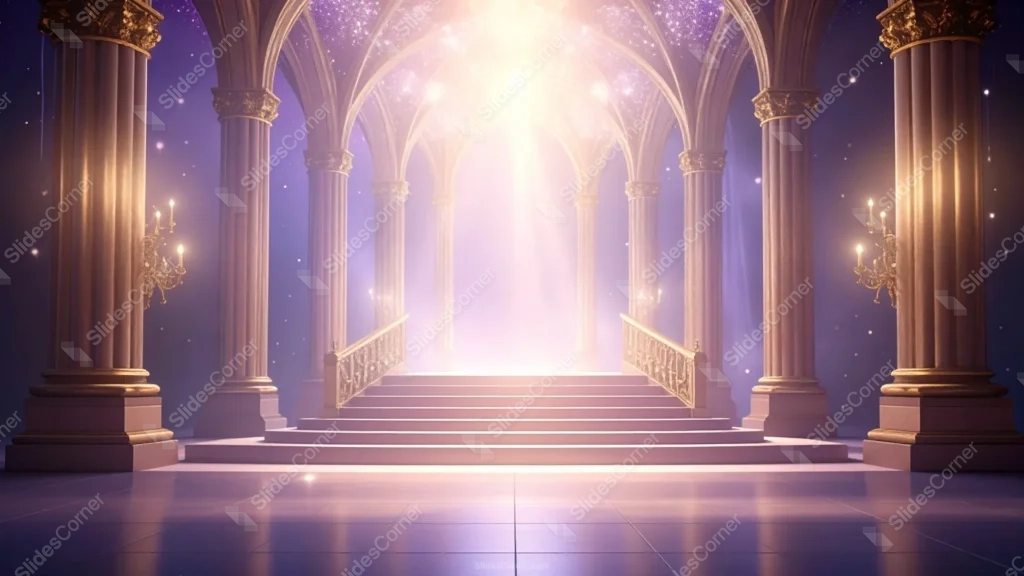
This elegant fantasy background for PowerPoint renders a grand palace hall in 3D, lined with gold-capped columns and lit candelabras leading up to a glowing staircase.
Above the arches, the vaulted ceiling dissolves into a starry purple night sky rather than solid stone.
What This Elegant Fantasy Background Looks Like
Tall gothic-arched columns with ornate gold capitals line both sides of the hall, each fitted with a lit gold candelabra partway up.
A wide staircase with carved gold railings climbs toward a bright archway at the center, where light pours down from an unseen source above.
The polished floor reflects the columns and light, while the ceiling above the arches glitters with stars against a deep purple sky.
Where This Elegant Fantasy Background For PowerPoint Fits
Its ceremonial grandeur suits award presentations, storytelling and fairy-tale content, luxury brand decks, and any presentation wanting a dramatic, regal opener.
It also works well as a closing slide, where the staircase leading upward gives a natural sense of conclusion.
Design Choices Behind the Palace Staircase
I centered a wide staircase leading up toward a bright archway, so the composition has a clear destination rather than an open, undefined space.
Lining the hall with gold-capped columns and lit candelabras, rather than plain pillars, gives the piece a warm, ceremonial feel instead of a cold, empty corridor.
Letting the vaulted ceiling dissolve into a starry purple night sky, rather than solid stone, sends the grandeur of the room upward into something more magical than a literal palace.
How to Apply It in PowerPoint
- Go to Design > Format Background.
- Choose Picture or texture fill, then Insert from file.
- Click Apply to All for the whole deck.
How to Apply It in Google Slides
- Open Slide > Change background.
- Click Choose image and upload the downloaded file.
- Select Done, repeating on each slide you want to match.
Legibility Tip for This Elegant Fantasy Background
Keep text over the reflective floor in the foreground, using white or cream type, well below the brightest part of the central archway.
Frequently Asked Questions
Is this elegant fantasy background free?
Yes, it’s a free download with no watermark and no account required.
Does it work in Google Slides too?
Yes, it’s a standard image file, so it applies the same way in both PowerPoint and Google Slides.
What resolution is included?
1920×1080 px, HD 16:9, suited to slides and to a desktop or phone wallpaper.
Can I use it as a wallpaper?
Yes, the 16:9 ratio matches most laptop and desktop screens.
Features at a Glance
- HD 1920×1080 resolution, 16:9 ratio
- Free download, no watermark
- Gold-capped columns with lit candelabras
- Central staircase leading to a glowing archway
- Starry purple sky ceiling
- Works as a PowerPoint background, Google Slides background, or wallpaper
Specs
- 1920 x 1080 px · 16:9 widescreen
- JPG, high quality, no compression artefacts
- PowerPoint · Google Slides · Keynote · Canva
- No watermark · no sign-up
- Free for personal and commercial use
You can use this Majestic Fantasy Palace Background with a Starlit Ceiling as a Wallpaper or use it as a background for slides.
Looking for something different? Browse all our free PPT Backgrounds, or see how to set a background in PowerPoint and Google Slides.








