You might also like:
This spring cherry blossom background for PowerPoint follows a woman in a flowing, pale pink dress as she walks a garden path beneath arching blossom branches.
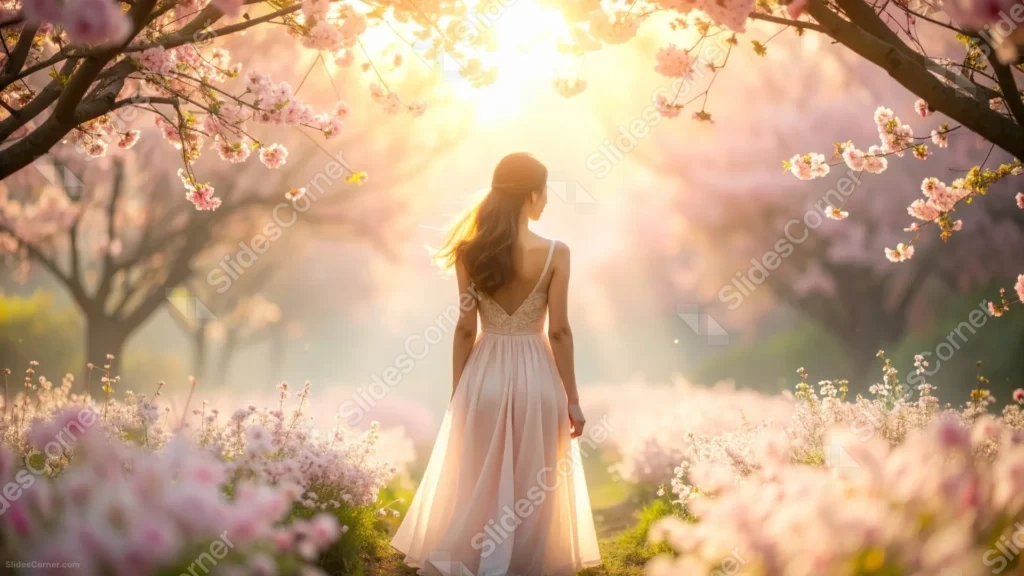
Sunlight pours down directly overhead, turning the branches translucent and wrapping her in a soft, golden glow.
What This Spring Cherry Blossom Background Looks Like
Seen from behind, a woman with long, wind-lifted hair stands mid-path in a sleeveless pink gown, her back and shoulders lit by the sun overhead.
Cherry blossom branches arch in from both upper corners, dense with pink blooms, while a bright sunburst fills the gap between them at the top of the frame.
Low beds of small white and pink flowers line the path on either side, blurred just enough to keep the focus on the woman and the light above her.
Where This Spring Cherry Blossom Background For PowerPoint Fits
- Wedding, engagement, or bridal shower slides
- Fashion, beauty, or lifestyle presentations
- Travel or destination decks featuring Japan or spring gardens
- A desktop wallpaper for anyone who loves a romantic spring scene
Design Choices Behind This Blossom Path
I placed the woman off-center and facing away, so she reads as a figure the viewer is walking behind rather than a portrait subject staring back at them.
Putting the sun directly overhead, rather than off to one side, was intentional: it back-lights both her hair and the blossoms at once, tying the two together in the same warm light.
Because the scene carries detail and a clear subject across the whole frame, I built it as a full wallpaper-style image rather than one with an empty text zone.
How to Apply It in PowerPoint
- Go to Design > Format Background.
- Choose Picture or texture fill, then Insert from file.
- Click Apply to All to carry it across the whole deck.
How to Apply It in Google Slides
- Open Slide > Change background.
- Click Choose image and upload the downloaded file.
- Select Done, repeating on any other slides you want to match.
Legibility Tip for This Cherry Blossom Background
Place short text along one side of the path, away from the woman, and add a soft shadow behind it so it stays legible against the busy blossoms.
Frequently Asked Questions
Is this cherry blossom background free?
Yes, it’s a free download with no watermark and no account required.
Does it work in Google Slides too?
Yes, it’s a standard image file, so it applies the same way in both PowerPoint and Google Slides.
What resolution is included?
1920×1080 px, HD 16:9, suited to slides and to a desktop or phone wallpaper.
Can I use it as a wallpaper?
Yes, the 16:9 ratio and warm, romantic light make it a lovely desktop wallpaper.
Features at a Glance
- HD 1920×1080 resolution, 16:9 ratio
- Free download, no watermark
- Woman in a flowing pink dress walking beneath cherry blossoms
- Bright, overhead sunburst through the branches
- Low flower beds lining the garden path
- Works as a PowerPoint background, Google Slides background, or wallpaper
Specs
- 1920 x 1080 px · 16:9 widescreen
- JPG, high quality, no compression artefacts
- PowerPoint · Google Slides · Keynote · Canva
- No watermark · no sign-up
- Free for personal and commercial use
You can use this Romantic Spring Cherry Blossom Background For PowerPoint as a Wallpaper or use it as a background for slides.
Looking for something different? Browse all our free PPT Backgrounds, or see how to set a background in PowerPoint and Google Slides.