

You might also like:




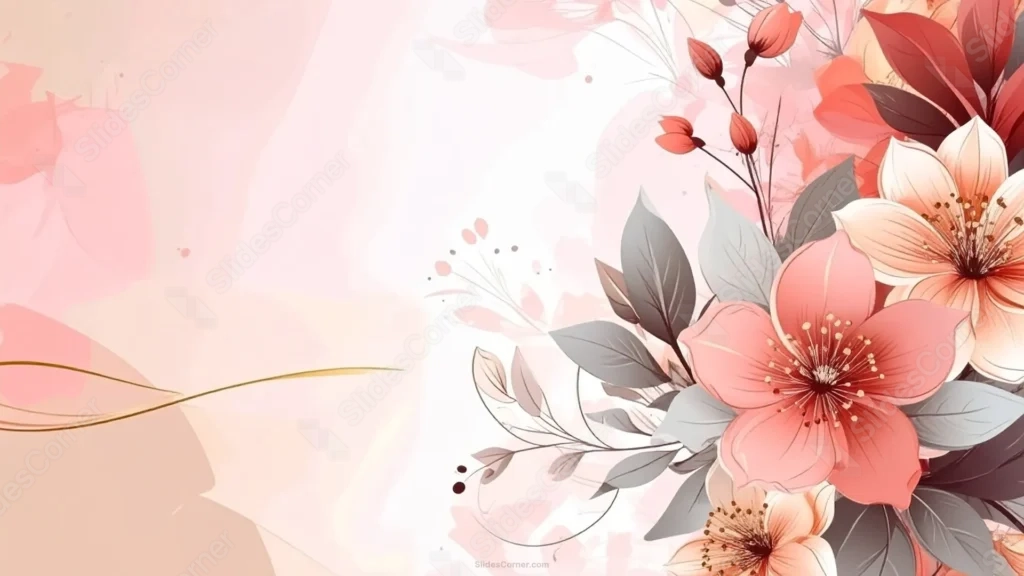
This aesthetic elegant floral PowerPoint background pushes its whole bouquet of coral and red blooms to the right third of the frame, leaving the rest completely open.
Cool gray leaves stand in for green foliage, keeping the palette quiet, while a single thin gold line curves across the open space on the left.
What This Aesthetic Elegant Floral Background Looks Like
A cluster of large coral, peach, and deep red blooms fills the right third of the frame, with fine linework detailing every petal and stamen.
Cool gray leaves weave through the bouquet instead of green, giving the arrangement a softer, more muted backdrop for the warm petal colors.
The left two-thirds stays a smooth blush-to-cream gradient, with only faint ghost silhouettes of petals and a single thin gold line drifting across it.
Where This Aesthetic Elegant Floral Background For PowerPoint Fits
It’s a strong fit for wedding or event program covers, beauty and fashion brand decks, elegant title slides, and any presentation wanting an asymmetric, editorial layout.
The wide open left side is ideal for a large title, a logo, or a short paragraph of body text.
Design Choices Behind the Side Bouquet
I pushed the entire bouquet to the right third of the frame, rather than framing all four corners, so the whole left two-thirds stays completely open for text.
Painting the leaves in cool gray instead of green lets them read as a quiet, elegant backdrop that doesn’t compete with the coral and red petals.
I let a single thin gold line curve across the open space, echoing a stem without adding any real visual weight to that side of the composition.
How to Apply It in PowerPoint
- Go to Design > Format Background.
- Choose Picture or texture fill, then Insert from file.
- Click Apply to All to use it across the whole deck.
How to Apply It in Google Slides
- Open Slide > Change background.
- Click Choose image and upload the downloaded file.
- Select Done, repeating on any other slides you want to match.
Legibility Tip for This Aesthetic Elegant Floral Background
Keep your text on the open left side, using a dark charcoal or deep maroon font, and leave the bouquet on the right untouched.
Frequently Asked Questions
Is this aesthetic elegant floral background free?
Yes, it’s a free download with no watermark and no account required.
Does it work in Google Slides too?
Yes, it’s a standard image file, so it applies the same way in both PowerPoint and Google Slides.
What resolution is included?
1920×1080 px, HD 16:9, suited to slides and to a desktop or phone wallpaper.
Can I use it as a wallpaper?
Yes, the 16:9 ratio matches most laptop and desktop screens.
Features at a Glance
- HD 1920×1080 resolution, 16:9 ratio
- Free download, no watermark
- Coral, peach, and red bouquet on the right third
- Cool gray leaves instead of green foliage
- Wide open left side with a single thin gold line
- Works as a PowerPoint background, Google Slides background, or wallpaper
Specs
- 1920 x 1080 px · 16:9 widescreen
- JPG, high quality, no compression artefacts
- PowerPoint · Google Slides · Keynote · Canva
- No watermark · no sign-up
- Free for personal and commercial use
You can use this Graceful Aesthetic Elegant Floral Background For PowerPoint as a Wallpaper or use it as a background for slides.
Looking for something different? Browse all our free PPT Backgrounds, or see how to set a background in PowerPoint and Google Slides.








