You might also like:
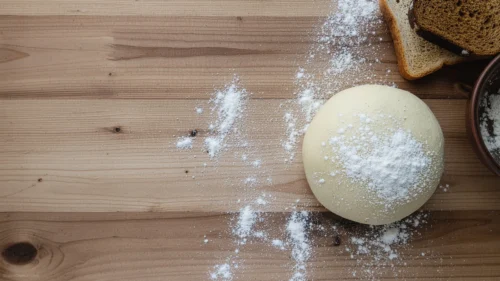
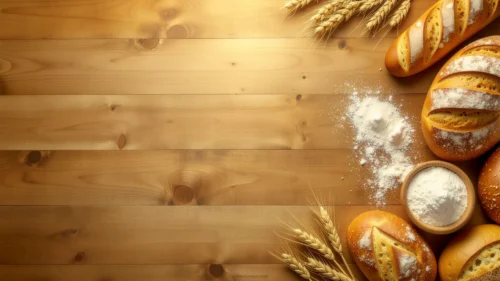
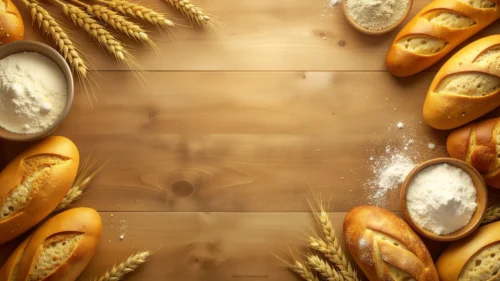

This baking bread background for PowerPoint reads like a working counter mid-bake, not a staged prop shot. A raw dough ball dusted in flour sits next to two crusty, deeply browned loaves, a wooden rolling pin, and a handful of loose eggs, all on warm brown wood.
Every prop is pushed toward the right third of the frame. The left two-thirds stay bare wood grain with just a light dusting of flour drifting in from the edge, leaving real, usable space for a title or a full block of text.
What This Baking Bread Background For PowerPoint Looks Like
A round ball of proofed dough, dusted heavily with flour, sits at the top center of the busy side, next to a loose pile of flour scattered straight onto the wood. It’s the clearest “before” moment in the shot.
Two finished sourdough loaves, one top-right and one bottom-right, show the “after”: deep golden crusts, cracked open with visible crumb. A third partial loaf sits just at the bottom edge of the frame.
A wooden rolling pin crosses the lower part of the frame at a diagonal, and several whole white eggs sit loose between the dough and the loaves, the kind of small, unstaged detail that keeps a flat lay from feeling too tidy.
Where This Baking Bread Background Fits
It suits bakery and restaurant pitch decks, recipe blogs, culinary school lessons, food brand presentations, and baking workshop slides, anywhere a deck wants to feel like an actual kitchen rather than a stock photo library.
The open wood on the left also works well behind a menu list or a step-by-step recipe, since the surface stays calm enough to hold several lines of text without competing with the food.
Design Choices Behind the Composition and Styling
I pushed every prop to the right on purpose, dough, bread, eggs, rolling pin, so the left side could stay genuinely open. A food background only earns its keep if there’s a real spot to drop a headline on.
I let the flour spill loosely toward the empty side instead of keeping it contained near the dough. A hard edge between “prop zone” and “text zone” looks designed; a soft dusting that fades out looks like an actual counter after real baking.
Shooting raw dough and finished loaves in the same frame was a deliberate choice, too. It tells a small before-and-after story on its own, without needing captions to explain what’s happening.
How to Apply It in PowerPoint
- Open your slide, go to Design > Format Background.
- Choose Picture or texture fill, then Insert from file and select the downloaded image.
- Click Apply to All for the whole deck, or leave it on a single title or menu slide.
How to Apply It in Google Slides
- Open Slide > Change background.
- Click Choose image and upload the downloaded file.
- Select Done. Repeat on each slide you want to match, since Slides applies backgrounds one at a time.
Legibility Tip for This Baking Bread Background
Keep text on the bare wood at the left, away from the dough, bread, and eggs on the right. Dark brown, black, or cream type all read well against the wood tone; avoid stacking text over the scattered flour, where contrast drops.
Frequently Asked Questions
Is this baking bread background free?
Yes, it’s a free download with no watermark and no account required.
Does it work in Google Slides too?
Yes. It’s a standard image file, so it uploads and applies the same way it does in PowerPoint.
What resolution is included?
1920×1080 px, HD 16:9, suited to slides and to a desktop or phone wallpaper.
Can I use it as a wallpaper?
Yes, the 16:9 ratio matches most laptop and desktop screens.
Features at a Glance
- HD 1920×1080 resolution, 16:9 ratio
- Free download, no watermark
- Raw dough, baked sourdough loaves, eggs, and a rolling pin on rustic wood
- Wide open, bare wood copy space on the left two-thirds
- Ideal for bakery, restaurant, and culinary presentations
- Works as a PowerPoint background, Google Slides background, or wallpaper
Specs
- 1920 x 1080 px · 16:9 widescreen
- JPG, high quality, no compression artefacts
- PowerPoint · Google Slides · Keynote · Canva
- No watermark · no sign-up
- Free for personal and commercial use
You can use this Rustic Wooden Bakery Background for Warm Culinary Presentations as a Wallpaper or use it as a background for slides.
Looking for something different? Browse all our free PPT Backgrounds, or see how to set a background in PowerPoint and Google Slides.