You might also like:






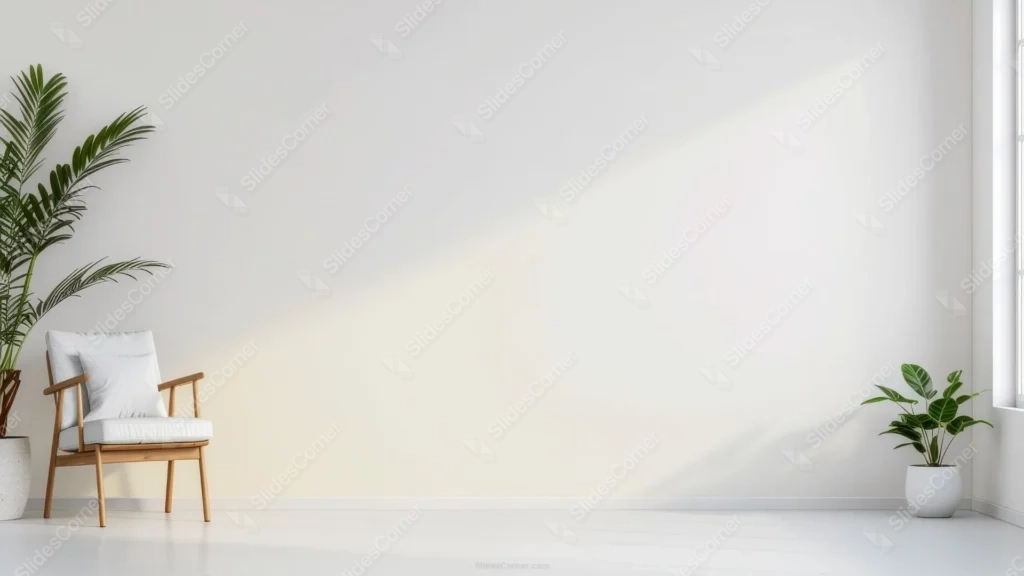
This minimalist white wall background for PowerPoint isn’t an empty room, it’s a lived-in corner: a wooden armchair with white cushions, a tall palm, and a second leafy plant framing a wide stretch of plain white wall lit by a low diagonal beam of afternoon sun.
That beam is doing real work. It splits the wall into a cooler shadowed half and a warm cream triangle where the light lands, so the background has quiet depth instead of sitting completely flat.
What This Minimalist White Wall Background Looks Like
The armchair sits low in the left corner, mid-century in shape, natural wood legs and arms, with a single loose cushion propped against the back. It anchors the frame without ever crowding the open wall.
A tall potted palm rises just behind the chair, and a second, broader-leafed plant sits near a bright window edge on the far right, so the greenery bookends the composition on both sides.
The floor is a pale, whitewashed wood, close enough in tone to the wall that the room reads as one continuous, airy space rather than a set of separate surfaces.
Where This Minimalist White Wall Background For PowerPoint Fits
It suits interior design and real estate decks, wellness and mindfulness talks, minimalist branding presentations, home or lifestyle blogs, and any deck that wants to feel calm, uncluttered, and a little upscale.
The wide, empty stretch of wall on the right two-thirds of the frame is built for a title, a short quote, or a simple stat, with the chair and plants staying comfortably out of the way.
Design Choices Behind the Light and Composition
I pushed every object, the chair, both plants, to the far left and far right edges on purpose, so the entire center of the wall stays open. A minimalist background only works if there’s actually empty space to use.
The diagonal sunbeam gave me a way to add visual interest without adding clutter. Rather than a flat gray or white fill, the light creates a soft gradient, roughly #F5F1E8 in the sunlit patch fading to a cooler #E8E6E1 in shadow, so the wall still feels like a real room.
Keeping the chair’s cushions white rather than a stronger color was deliberate too. Anything saturated in that corner would pull attention away from the text you place on the wall.
How to Apply It in PowerPoint
- Open your slide, go to Design > Format Background.
- Choose Picture or texture fill, then Insert from file and select the downloaded image.
- Click Apply to All for the whole deck, or leave it on a single title or section slide.
How to Apply It in Google Slides
- Open Slide > Change background.
- Click Choose image and upload the downloaded file.
- Select Done. Repeat on each slide you want to match, since Slides applies backgrounds one at a time.
Legibility Tip for This Minimalist White Wall Background
Place text in the open right two-thirds of the wall, away from the chair and plants. Dark gray or black type reads cleanly here; keep it out of the brightest part of the sunbeam, where pale text can wash out.
Frequently Asked Questions
Is this minimalist white wall background free?
Yes, it’s a free download with no watermark and no account required.
Does it work in Google Slides too?
Yes. It’s a standard image file, so it uploads and applies the same way it does in PowerPoint.
What resolution is included?
1920×1080 px, HD 16:9, suited to slides and to a desktop or phone wallpaper.
Can I use it as a wallpaper?
Yes, the 16:9 ratio matches most laptop and desktop screens.
Features at a Glance
- HD 1920×1080 resolution, 16:9 ratio
- Free download, no watermark
- Wooden armchair with white cushions and two potted plants framing the scene
- Soft diagonal sunbeam splitting the wall into warm and cool tones
- Wide open wall space on the right, ideal for titles and text
- Works as a PowerPoint background, Google Slides background, or wallpaper
Specs
- 1920 x 1080 px · 16:9 widescreen
- JPG, high quality, no compression artefacts
- PowerPoint · Google Slides · Keynote · Canva
- No watermark · no sign-up
- Free for personal and commercial use
You can use this Serene Sunlit White Room Background for Calm Business Presentations as a Wallpaper or use it as a background for slides.
Looking for something different? Browse all our free PPT Backgrounds, or see how to set a background in PowerPoint and Google Slides.