You might also like:






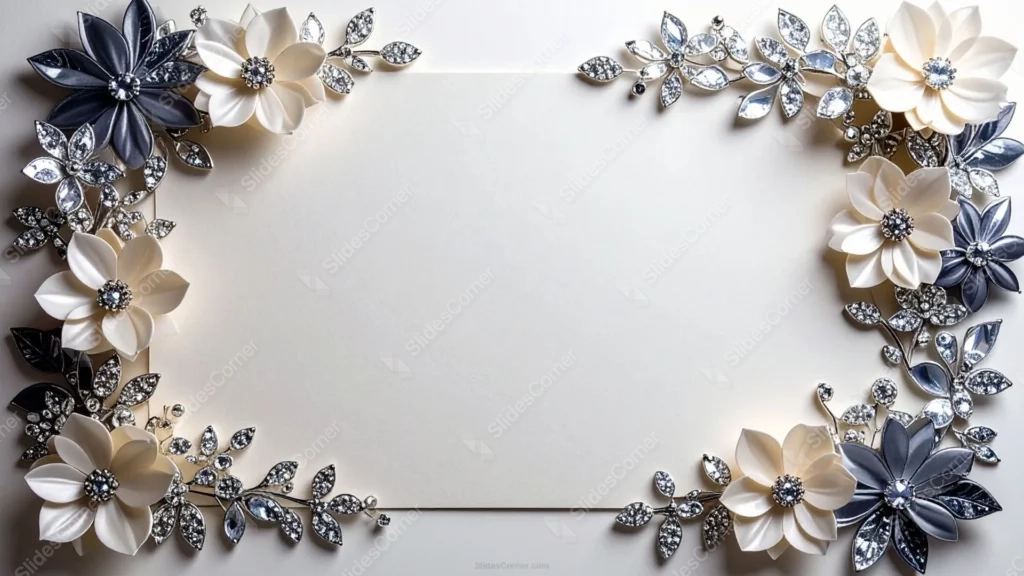
This classy elegant floral PowerPoint background frames all four corners with jeweled flower clusters instead of a single spray on one side. Deep navy and charcoal petals sit alongside ivory blooms, each center set with a cut crystal, and silver rhinestone leaves fill in the gaps between them.
The effect sits closer to fine jewelry or a couture brooch than a painted or photographed flower. Every petal has a slight metallic sheen, and the scattered gems catch light differently depending on where you look, which keeps the corners feeling detailed rather than static.
A plain, warm cream card fills the center, with a faint edge line suggesting the border of an actual invitation or stationery card rather than a borderless digital background.
What This Classy Elegant Floral PowerPoint Background Suits
It’s built for black-tie events, formal galas, luxury brand presentations, high-end wedding stationery, and any deck where navy and silver already signal the occasion before a single word of text appears.
Because all four corners match in style and weight, it also holds up well as a repeating background across a full deck, not just a title slide, since nothing shifts dramatically from one side to the other.
Design Choices Behind the Navy and Silver Jewels
Navy paired with silver reads as more formal than navy paired with gold. I wanted this one to feel closer to evening wear than daytime stationery, so I kept the metal tone cool throughout, from the rhinestone leaves to the crystal centers.
The cream card sits near #F5F1E8, warm enough to keep the piece from feeling cold despite the silver and navy, while the darkest flower petals drop to near #1C2438. That contrast is what lets the jeweled corners read clearly even at a glance.
Matching all four corners in density and color, rather than varying them the way I have on other floral backgrounds, was deliberate here. Formal, symmetrical design reads as more considered and appropriate for black-tie or luxury contexts than an asymmetrical arrangement would.
How to Apply It in PowerPoint
- Open your slide, go to Design > Format Background.
- Choose Picture or texture fill, then Insert from file and select the downloaded image.
- Click Apply to All for the whole deck, or use it on a single title or closing slide.
How to Apply It in Google Slides
- Open Slide > Change background.
- Click Choose image and upload the file from your computer.
- Select Done. Repeat on each slide you want to match, since Slides sets backgrounds one at a time.
Legibility Tip for This Jeweled Floral Background
Keep text inside the open cream center, clear of all four corners. Dark navy, charcoal, or black text reads cleanly there; a muted silver or gray also works if you want the text to echo the jewel tones.
Frequently Asked Questions
Is this classy elegant floral PowerPoint background free?
Yes, it’s a free download with no watermark and no account required.
Does it work in Google Slides?
Yes. It’s a standard image file, so it uploads and applies the same way it does in PowerPoint.
What resolution is included?
1920×1080 px, HD 16:9, suited to slides and to a desktop or phone wallpaper.
Is it only for weddings?
No. The navy and silver palette also suits galas, corporate award nights, and luxury brand decks.
Features at a Glance
- HD 1920×1080 resolution, 16:9 ratio
- Free download, no watermark
- Navy and cream jeweled flower clusters in all four corners
- Silver rhinestone leaves and crystal flower centers
- Wide open cream center for titles and text
- Works as a PowerPoint background, Google Slides background, or wallpaper
Specs
- 1920 x 1080 px · 16:9 widescreen
- JPG, high quality, no compression artefacts
- PowerPoint · Google Slides · Keynote · Canva
- No watermark · no sign-up
- Free for personal and commercial use
You can use this Opulent Navy Silver Floral Background for Formal Slides as a Wallpaper or use it as a background for slides.
Looking for something different? Browse all our free PPT Backgrounds, or see how to set a background in PowerPoint and Google Slides.