






Creative Background Design for PowerPoint With Flat Triangles
Free HD 16:9 creative background with flat colorful triangles, no watermark, for PowerPoint.
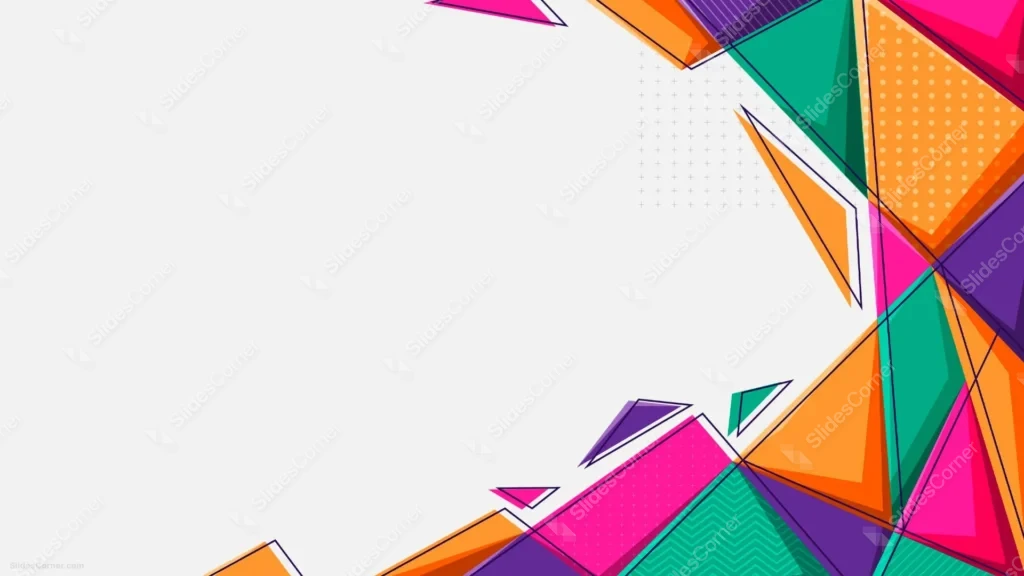
This background is for anyone who wants a slide that feels playful and modern without leaning on gradients or 3D shading. It’s a full HD 16:9 creative background design for PowerPoint: a cluster of flat, solid-color triangles in hot pink, orange, teal, and purple, packed into the right side of the frame, with a wide, untouched white canvas taking up the left two-thirds. Free to download, no watermark, ready for PowerPoint, Google Slides, or as a plain wallpaper.
What This Creative Background Design for PowerPoint Looks Like
This one sits firmly in flat, Memphis-style illustration rather than photographic texture or shaded 3D geometry. Overlapping triangles in magenta, orange, teal green, and purple fill the top-right and bottom-right corners, some solid, some carrying a small pattern inside — polka dots, a plus-sign grid, or a thin chevron zigzag.
Loose black outline triangles float on top of the solid shapes, overlapping them at odd angles like a second, looser layer of sketch marks. A scattering of small grey plus-sign marks sits quietly in the empty space near the top-right cluster, adding texture without adding color. The left two-thirds of the frame stays pure white, completely free of any shapes.
Design Notes: Why the Color Lives Only on One Side
Flat, saturated color across an entire frame gets tiring fast, and it leaves nowhere obvious to put text. Pushing every triangle into the right side of the composition solves both problems at once: the color and pattern variety reads as playful and energetic, but the left side stays completely calm and ready for a headline, a logo, or a full paragraph of body copy.
I mixed four colors instead of two or three because flat design tolerates — even benefits from — more variety than a shaded or photographic background would. Solid, unshaded color blocks don’t fight each other the way gradients can, so pink, orange, teal, and purple can sit right next to each other without looking chaotic. The small patterned fills inside a few triangles add detail for anyone looking closely, without changing the overall color read from a distance. Keeping the outline triangles in a single dark navy, rather than matching each fill color, ties the whole cluster together as one shape rather than four separate ones.
Where to Use This Creative Background for PowerPoint
- Marketing, branding, or creative agency presentations
- Education, kids’ content, or classroom slides
- Startup pitch decks with a playful, approachable tone
- Event flyers, workshops, or community presentations
- Social media strategy or content calendar decks
- Desktop or phone wallpaper for a bright, energetic look
Key features at a glance:
- Full HD resolution, 16:9 aspect ratio
- No watermark, no logo, free for personal and commercial use
- Flat, Memphis-style triangle cluster in pink, orange, teal, and purple
- Solid colors and small patterns, no gradients or shading
- Wide, empty white canvas built for text legibility
- Works as a PowerPoint background, Google Slides background, or wallpaper
How to Apply This Background in PowerPoint
Once you’ve downloaded the file:
- Open your PowerPoint presentation and go to the Design tab
- Click Format Background on the right side of the ribbon
- Select Picture or texture fill, then Insert from a file
- Choose the downloaded creative triangle image
- Click Apply to All if you want it on every slide, or leave it on just the current one
How to Apply It in Google Slides
- Open your presentation and click Background in the toolbar
- Click Choose image, then Upload from computer
- Select the file and confirm
- Click Done, or Add to theme to carry it across every slide automatically
Readability Tip
Keep your title and body text in the open white space on the left, away from the triangle cluster. Dark navy, charcoal, or black text in a friendly, rounded sans-serif — Poppins, Quicksand, or Nunito — matches the playful tone of this background best.
FAQ
Is this creative background design free?
Yes. It’s a single free download, no watermark, no account required.
Does it work in Google Slides, or only PowerPoint?
Both. It’s a plain image file, so it uploads the same way into either tool.
What resolution do I get?
Full HD, 1920×1080, in a 16:9 aspect ratio — sharp on any modern screen or projector.
Can I use it as a wallpaper instead of a slide background?
Yes, the same file works as a desktop or phone wallpaper without needing to resize it for most widescreen displays.
Specs
- 1920 x 1080 px · 16:9 widescreen
- JPG, high quality, no compression artefacts
- PowerPoint · Google Slides · Keynote · Canva
- No watermark · no sign-up
- Free for personal and commercial use
You can use this Playful Colorful Flat Triangle Background Perfect for Creative Presentations as a Wallpaper or use it as a background for slides.
Looking for something different? Browse all our free PPT Backgrounds, or see how to set a background in PowerPoint and Google Slides.








