






Forest Background For PowerPoint With A Magical Lantern-Lit Road
Free forest background for PowerPoint with a lantern-lit road under a starry sky.
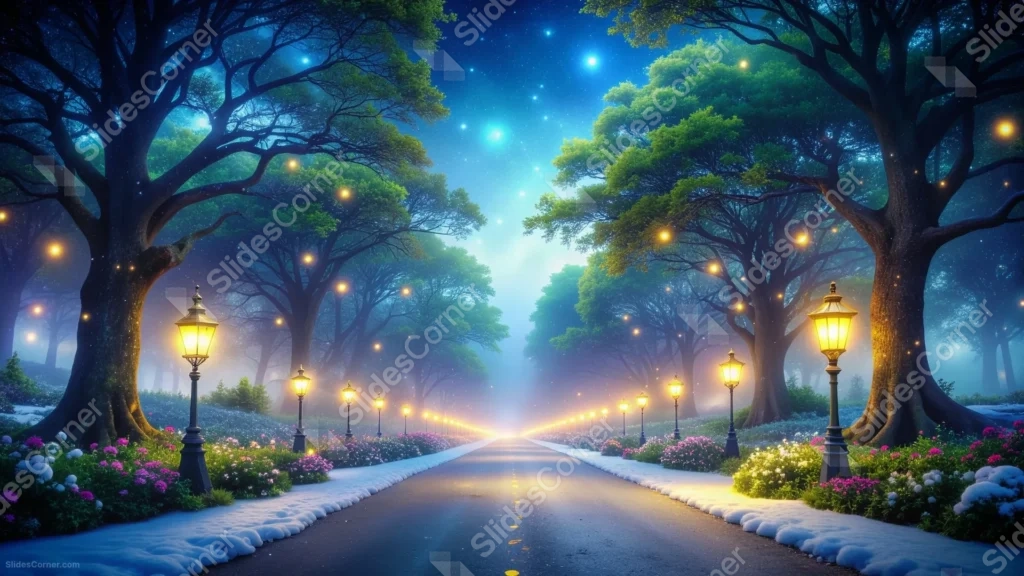
This forest background for PowerPoint follows a quiet road lined with glowing lanterns, cutting straight through a canopy of tall, dark trees toward a bright horizon.
A dusting of snow lines the curbs, and beds of pink and white flowers spill along both sides beneath a sky scattered with stars.
What This Forest Background Looks Like
Rows of ornate lanterns march down both sides of a paved road, each one glowing amber against the deep blue-green of the surrounding forest.
Overhead, thick tree canopies arch inward from both sides, framing a starry sky with a few soft blue lights drifting like fireflies among the branches.
The road itself glows faintly at the vanishing point, where a warm light seems to rise from just beyond the horizon, drawing the eye all the way through the scene.
Where This Forest Background For PowerPoint Fits
- Fantasy, storytelling, or fairy tale presentations
- Holiday, winter, or nighttime event decks
- Travel or destination showcases
- A desktop wallpaper for anyone who loves a dreamy night scene
Design Choices Behind This Lantern-Lit Road
I ran the road straight down the center of the frame so the lanterns naturally form two converging lines, pulling the eye toward the glow at the horizon.
Keeping the tree canopy dark and dense at the top, rather than letting it thin out, makes the warm lantern light feel more precious against all that surrounding shadow.
Because trees, lanterns, and flowerbeds fill every edge of the frame, I treated this as a full wallpaper-style scene rather than one built around a blank text zone.
How to Apply It in PowerPoint
- Go to Design > Format Background.
- Choose Picture or texture fill, then Insert from file.
- Click Apply to All to carry it across the whole deck.
How to Apply It in Google Slides
- Open Slide > Change background.
- Click Choose image and upload the downloaded file.
- Select Done, repeating on any other slides you want to match.
Legibility Tip for This Forest Background
Place your headline near the bottom of the road, where the pavement is darkest and most even, and use a white or pale gold font for contrast.
Frequently Asked Questions
Is this forest background free?
Yes, it’s a free download with no watermark and no account required.
Does it work in Google Slides too?
Yes, it’s a standard image file, so it applies the same way in both PowerPoint and Google Slides.
What resolution is included?
1920×1080 px, HD 16:9, suited to slides and to a desktop or phone wallpaper.
Can I use it as a wallpaper?
Yes, the 16:9 ratio and atmospheric lighting make it a striking desktop wallpaper.
Features at a Glance
- HD 1920×1080 resolution, 16:9 ratio
- Free download, no watermark
- Glowing lantern-lined road through a dense forest
- Starry night sky and drifting firefly-like lights
- Snow-dusted curbs and pink and white flowerbeds
- Works as a PowerPoint background, Google Slides background, or wallpaper
Specs
- 1920 x 1080 px · 16:9 widescreen
- JPG, high quality, no compression artefacts
- PowerPoint · Google Slides · Keynote · Canva
- No watermark · no sign-up
- Free for personal and commercial use
You can use this Enchanted Forest Background For PowerPoint as a Wallpaper or use it as a background for slides.
Looking for something different? Browse all our free PPT Backgrounds, or see how to set a background in PowerPoint and Google Slides.








