You might also like:
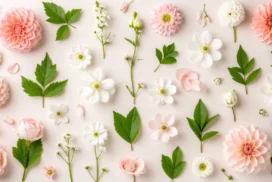





This elegant floral background for PowerPoint gathers real cream and lilac dahlias, small blossoms, and baby’s breath sprigs across a solid soft pink surface.
Every bloom sits clustered along the right two-thirds of the frame, leaving the entire left third open and plain for text.
What This Elegant Floral Background Looks Like
Large cream and pale lilac dahlias anchor the right edge, surrounded by smaller white and periwinkle blossoms, delicate baby’s breath sprigs, and a single green leaf.
These are photographed real flowers, not illustrations, so soft natural shadows fall under every petal edge.
The left third of the frame stays a completely plain, solid lilac-pink, with no petals or stems crossing into it at all.
Where This Elegant Floral Background For PowerPoint Fits
The guaranteed open left side makes it a reliable choice for title slides, wedding and event decks, beauty and lifestyle brands, and any presentation needing a left-aligned text block.
It also suits spring product launches and floral-adjacent business content, like florists or event planners.
Design Choices Behind the Dahlia Layout
I worked with photographed real dahlias rather than illustrating them, so the texture and light stay true to life, with petal edges catching real, soft shadow.
Clustering every bloom into the right two-thirds and leaving the left third completely plain guarantees a clean space for a title, without cropping a single flower.
Mixing cream, blush, and pale lilac blooms together, instead of a single flower color, keeps the palette soft without going monotone, and the one green leaf is the only cool-toned note in the frame.
How to Apply It in PowerPoint
- Go to Design > Format Background.
- Choose Picture or texture fill, then Insert from file.
- Click Apply to All for the whole deck.
How to Apply It in Google Slides
- Open Slide > Change background.
- Click Choose image and upload the downloaded file.
- Select Done, repeating on each slide you want to match.
Legibility Tip for This Elegant Floral Background
Keep your text inside the plain left third, using dark plum or charcoal type, since the right side is fully occupied by flowers.
Frequently Asked Questions
Is this elegant floral background free?
Yes, it’s a free download with no watermark and no account required.
Does it work in Google Slides too?
Yes, it’s a standard image file, so it applies the same way in both PowerPoint and Google Slides.
What resolution is included?
1920×1080 px, HD 16:9, suited to slides and to a desktop or phone wallpaper.
Can I use it as a wallpaper?
Yes, the 16:9 ratio matches most laptop and desktop screens.
Features at a Glance
- HD 1920×1080 resolution, 16:9 ratio
- Free download, no watermark
- Real photographed dahlias and small blossoms
- Cream, blush, and pale lilac color mix
- Fully open, plain left third for text
- Works as a PowerPoint background, Google Slides background, or wallpaper
Specs
- 1920 x 1080 px · 16:9 widescreen
- JPG, high quality, no compression artefacts
- PowerPoint · Google Slides · Keynote · Canva
- No watermark · no sign-up
- Free for personal and commercial use
You can use this Delicate Dahlia Floral Background with Open Pastel Space as a Wallpaper or use it as a background for slides.
Looking for something different? Browse all our free PPT Backgrounds, or see how to set a background in PowerPoint and Google Slides.