


Elegant Floral Background For Google Slides With Magnolia And Silk
Free elegant floral background for Google Slides with 3D magnolia blooms draped in flowing blue silk.
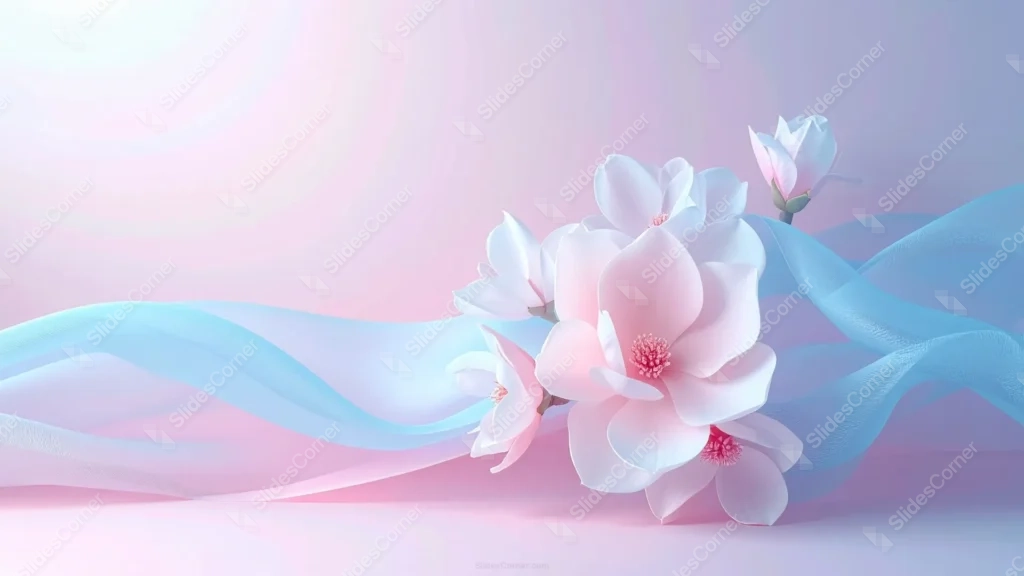
This elegant floral background for Google Slides renders soft white and pink magnolia blooms in 3D, wrapped in a flowing ribbon of blue silk.
The flowers and fabric sit together in the right two-thirds of the frame, while the upper-left quarter stays open with only a soft glow.
What This Elegant Floral Background Looks Like
A cluster of large magnolia blooms, rendered with real dimension and soft highlights, opens across the center-right, with one bud reaching up in the upper-right corner.
A translucent blue silk ribbon flows diagonally through and behind the petals, its folds catching light the way real fabric would.
The backdrop shifts gently from pale pink to soft lavender-blue, with a warm glow lighting the upper-left corner where the frame is otherwise empty.
Where This Elegant Floral Background For Google Slides Fits
The open upper-left corner makes it a strong fit for title slides, wedding and event decks, beauty brands, and any presentation wanting a soft, luxurious feel.
It also suits spa, wellness, and skincare content, where the pastel palette and silk texture reinforce a gentle, premium tone.
Design Choices Behind the Magnolia and Silk
I rendered the magnolias in 3D rather than photographing or flatly illustrating them, so every petal picks up soft, realistic light and a touch of real dimension.
Running the silk ribbon diagonally through the flowers, instead of only behind them, lets fabric and petals overlap so the two elements feel woven together rather than simply stacked.
Keeping the entire upper-left quarter clear, with just a soft glow and no ribbon or bloom crossing into it, gives text a genuinely open, uncluttered spot to sit.
How to Apply It in Google Slides
- Open Slide > Change background.
- Click Choose image and upload the downloaded file.
- Select Done, repeating on each slide you want to match.
How to Apply It in PowerPoint
- Go to Design > Format Background.
- Choose Picture or texture fill, then Insert from file.
- Click Apply to All for the whole deck.
Legibility Tip for This Elegant Floral Background
Keep your text in the upper-left quarter, using dark plum or charcoal type, since it’s the only fully clear area in the frame.
Frequently Asked Questions
Is this elegant floral background free?
Yes, it’s a free download with no watermark and no account required.
Does it work in PowerPoint too?
Yes, it’s a standard image file, so it applies the same way in both PowerPoint and Google Slides.
What resolution is included?
1920×1080 px, HD 16:9, suited to slides and to a desktop or phone wallpaper.
Can I use it as a wallpaper?
Yes, the 16:9 ratio matches most laptop and desktop screens.
Features at a Glance
- HD 1920×1080 resolution, 16:9 ratio
- Free download, no watermark
- 3D-rendered magnolia blooms with realistic light
- Flowing translucent blue silk ribbon
- Fully open upper-left quarter for text
- Works as a Google Slides background, PowerPoint background, or wallpaper
Specs
- 1920 x 1080 px · 16:9 widescreen
- JPG, high quality, no compression artefacts
- PowerPoint · Google Slides · Keynote · Canva
- No watermark · no sign-up
- Free for personal and commercial use
You can use this Dreamy 3D Magnolia Background with Flowing Silk Ribbon as a Wallpaper or use it as a background for slides.
Looking for something different? Browse all our free PPT Backgrounds, or see how to set a background in PowerPoint and Google Slides.








