

You might also like:




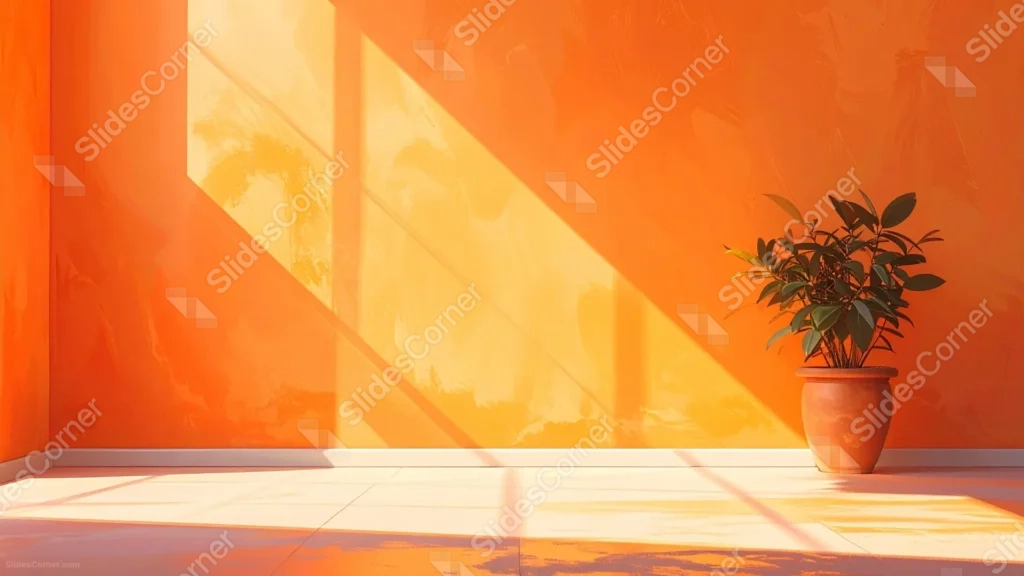
This aesthetic orange background for PowerPoint renders a textured terracotta room, its walls cut diagonally by a sharp beam of window light.
A single leafy plant in a clay pot sits in the corner, catching the same warm light that spills across the tiled floor.
What This Aesthetic Orange Background Looks Like
A rough, painterly stucco wall in deep orange fills most of the frame, its surface catching visible brushwork and texture under the light.
A diagonal beam of golden sunlight cuts across the wall from an unseen window, splitting the space into a brighter, warmer triangle and a deeper shadowed corner.
A terracotta pot holding a full, leafy plant sits at the base of the wall on the right, grounding the scene at floor level.
Where This Aesthetic Orange Background For PowerPoint Fits
- Interior design, real estate, or lifestyle presentations
- Wellness, self-care, or slow-living content
- Travel decks featuring warm, Mediterranean destinations
- Any title slide wanting a warm, sun-drenched mood
Design Choices Behind This Sunlit Wall
I gave the wall real stucco texture, rather than a flat color fill, so the light has something to catch and the whole surface feels like an actual sunlit room.
Cutting the light in on a sharp diagonal, instead of lighting the wall evenly, gives the piece a strong sense of time of day and a natural focal point.
Placing the plant only in the corner keeps the large center of the wall open, so the texture and light can carry a headline without any competing detail.
How to Apply It in PowerPoint
- Go to Design > Format Background.
- Choose Picture or texture fill, then Insert from file.
- Click Apply to All to carry it across the whole deck.
How to Apply It in Google Slides
- Open Slide > Change background.
- Click Choose image and upload the downloaded file.
- Select Done, repeating on any other slides you want to match.
Legibility Tip for This Aesthetic Orange Background
Place your headline in the darker upper-left corner, using a white or cream font, since that area stays furthest from the plant and brightest light beam.
Frequently Asked Questions
Is this aesthetic orange background free?
Yes, it’s a free download with no watermark and no account required.
Does it work in Google Slides too?
Yes, it’s a standard image file, so it applies the same way in both PowerPoint and Google Slides.
What resolution is included?
1920×1080 px, HD 16:9, suited to slides and to a desktop or phone wallpaper.
Can I use it as a wallpaper?
Yes, the 16:9 ratio matches most laptop and desktop screens.
Features at a Glance
- HD 1920×1080 resolution, 16:9 ratio
- Free download, no watermark
- Textured terracotta stucco wall
- Sharp diagonal beam of window light
- Potted plant accent in the corner
- Works as a PowerPoint background, Google Slides background, or wallpaper
Specs
- 1920 x 1080 px · 16:9 widescreen
- JPG, high quality, no compression artefacts
- PowerPoint · Google Slides · Keynote · Canva
- No watermark · no sign-up
- Free for personal and commercial use
You can use this Warm Aesthetic Orange Background For PowerPoint as a Wallpaper or use it as a background for slides.
Looking for something different? Browse all our free PPT Backgrounds, or see how to set a background in PowerPoint and Google Slides.








