You might also like:




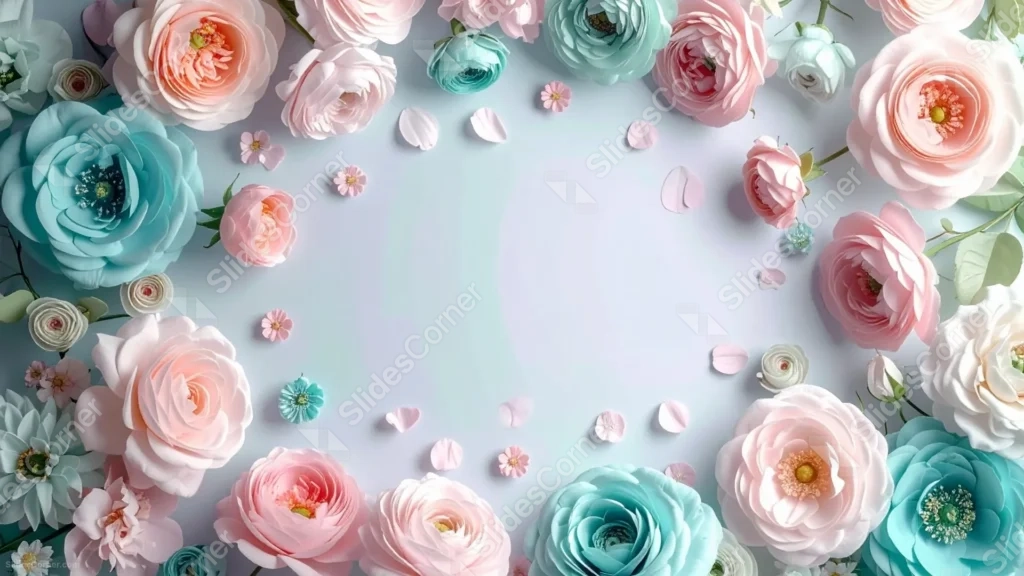
This floral frame background for Google Slides arranges full pastel roses in mint, pink, peach, and white around the edges, leaving a soft, open oval at the center.
Tiny scattered petals and small confetti-like blooms drift into the empty middle, so the frame never feels stiff or too formal.
What This Floral Frame Background Looks Like
Large, fully bloomed roses fill the top, bottom, and side edges, shot from directly above in a flat-lay style with soft, even light.
The color mix stays deliberately cool and light: mint and pale teal roses sit next to blush pink and cream ones, with a few loose petals and small five-petal blossoms scattered just inside the ring.
The center itself fades from pale lavender to white, completely free of flowers.
Where This Floral Frame Background For Google Slides Fits
- Wedding programs, invitations, and reception slides
- Baby showers, bridal showers, and birthday decks
- Beauty, floristry, or spa presentations
- Any title slide wanting a soft, romantic border
Design Choices Behind the Pastel Rose Ring
I chose a mint-and-pink palette instead of an all-pink one because the cooler mint tones keep the frame from tipping into overly sweet territory.
Keeping the roses fully out at the edges, with only a handful of loose petals drifting inward, was intentional: it protects a large, genuinely clear oval for text.
Shooting the flowers flat-lay, straight from above, gives every bloom the same scale and lighting, so the ring reads as one cohesive frame rather than a collage.
How to Apply It in PowerPoint
- Go to Design > Format Background.
- Choose Picture or texture fill, then Insert from file.
- Click Apply to All to carry it across the whole deck.
How to Apply It in Google Slides
- Open Slide > Change background.
- Click Choose image and upload the downloaded file.
- Select Done, repeating on any other slides you want to match.
Legibility Tip for This Floral Frame Background
Keep text inside the pale center oval, and use a dark plum or charcoal font, since that area has the lightest, most even background in the whole image.
Frequently Asked Questions
Is this floral frame background free?
Yes, it’s a free download with no watermark and no account required.
Does it work in PowerPoint too?
Yes, it’s a standard image file, so it applies the same way in both Google Slides and PowerPoint.
What resolution is included?
1920×1080 px, HD 16:9, suited to slides and to a desktop or phone wallpaper.
Can I use it as a wallpaper?
Yes, the 16:9 ratio matches most laptop and desktop screens.
Features at a Glance
- HD 1920×1080 resolution, 16:9 ratio
- Free download, no watermark
- Ring of pastel roses in mint, pink, peach, and white
- Loose petals and tiny blossoms drifting inward
- Large, clear oval center for text
- Works as a Google Slides background, PowerPoint background, or wallpaper
Specs
- 1920 x 1080 px · 16:9 widescreen
- JPG, high quality, no compression artefacts
- PowerPoint · Google Slides · Keynote · Canva
- No watermark · no sign-up
- Free for personal and commercial use
You can use this Delicate Floral Frame Background For Google Slides as a Wallpaper or use it as a background for slides.
Looking for something different? Browse all our free PPT Backgrounds, or see how to set a background in PowerPoint and Google Slides.