You might also like:
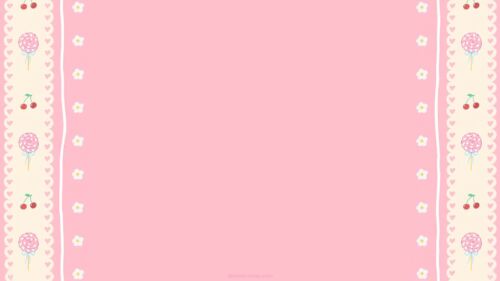


This cute baby blue background for Google Slides pairs a wide, calm baby blue center with playful pink lace-style trim running across the top and bottom.
Everything about it reads as handmade stationery rather than a photo or a painting, closer to a sheet of cute scrapbook paper or washi tape than a typical slide background.
What This Cute Baby Blue Background Looks Like
Along the top and bottom, a pink polka-dot band gives way to a scalloped, lace-like edge, then a cream strip dotted with tiny red flower and star shapes, and finally a hand-stitched dashed line.
The rest of the frame is a single, flat baby blue panel, left completely open so nothing competes with your content.
The mirrored trim at top and bottom keeps the design symmetrical and calm, more like a framed border than a busy pattern.
Where This Baby Blue Background For Google Slides Fits
It suits kids’ birthday invitations, baby shower slides, school and classroom presentations, cute planner or journal templates, and any content aimed at a young or playful audience.
The wide open center also makes it easy to drop in photos, stickers, or bullet points without crowding the trim.
Design Choices Behind the Lace Trim
I built the trim in layers, polka dots, a scalloped edge, tiny flower shapes, and a stitched line, because a single flat stripe would feel plain, while stacking small details gives it a handmade, papercraft quality.
Pink against baby blue is a classic pastel pairing, but I kept the pink confined to the top and bottom bands so the two colors don’t fight for space in the middle.
Leaving the full center panel plain and uncluttered was intentional. Cute doesn’t have to mean busy, and a calm center makes the trim feel like a frame rather than noise.
How to Apply It in Google Slides
- Open Slide > Change background.
- Click Choose image and upload the downloaded file.
- Select Done, repeating on each slide you want to match.
How to Apply It in PowerPoint
- Go to Design > Format Background.
- Choose Picture or texture fill, then Insert from file.
- Click Apply to All, or leave it on a single slide.
Legibility Tip for This Baby Blue Background
Keep text in the open blue center, clear of the trim. Dark navy, brown, or charcoal text all read cleanly against the flat baby blue.
Frequently Asked Questions
Is this cute baby blue background free?
Yes, it’s a free download with no watermark and no account required.
Does it work in PowerPoint too?
Yes, it’s a standard image file, so it applies the same way in both PowerPoint and Google Slides.
What resolution is included?
1920×1080 px, HD 16:9, suited to slides and to a desktop or phone wallpaper.
Can I use it as a wallpaper?
Yes, the 16:9 ratio matches most laptop and desktop screens.
Features at a Glance
- HD 1920×1080 resolution, 16:9 ratio
- Free download, no watermark
- Pink polka-dot and lace-style trim, top and bottom
- Tiny stitched flower and star details
- Wide open baby blue center for text
- Works as a Google Slides background, PowerPoint background, or wallpaper
Specs
- 1920 x 1080 px · 16:9 widescreen
- JPG, high quality, no compression artefacts
- PowerPoint · Google Slides · Keynote · Canva
- No watermark · no sign-up
- Free for personal and commercial use
You can use this Sweet Kawaii Baby Blue Background with Pink Polka-Dot Lace Trim as a Wallpaper or use it as a background for slides.
Looking for something different? Browse all our free PPT Backgrounds, or see how to set a background in PowerPoint and Google Slides.