
You might also like:


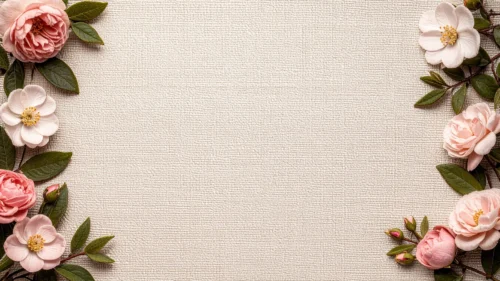


This floral frame background for PowerPoint uses an actual empty white wooden picture frame instead of just an open shape of negative space, sitting centered on a soft blush pink backdrop.
Peach peonies and blush garden roses cluster at the top-left and bottom-left of the frame, while cream peonies and pale roses fill the top-right and bottom-right, with loose petals and baby’s breath scattered in between.
What This Floral Frame Background For PowerPoint Looks Like
The frame itself is plain white wood, simple and unadorned, with its interior mat a slightly lighter blush than the surrounding background, which gently outlines the empty content area.
Flowers cluster in matched pairs at all four corners rather than forming a closed ring, so the frame itself always stays fully visible and unobstructed.
Trailing green leaves, loose petals, and small white baby’s breath sprigs drift into the gaps between the flower clusters and the frame, keeping the composition from feeling like four separate bouquets.
Where This Floral Frame Background Fits
It’s built for wedding save-the-dates, memory board or photo mockup slides, baby shower and Mother’s Day presentations, and beauty brand decks that want an obvious “frame” for a photo, logo, or quote.
Because the frame reads instantly as a content area, it works especially well anywhere you want the viewer to know exactly where to look, without needing a caption to explain it.
Design Choices Behind the Frame and Flowers
I used a real picture frame instead of an abstract wreath shape because a frame reads immediately as “put your content here,” more literal and obvious than an open circle of flowers ever manages.
Keeping the frame plain white wood rather than ornate was deliberate. Anything busier would compete with the peonies and roses; a simple frame lets the flowers carry all the visual richness.
I shifted the frame’s interior mat a shade lighter than the outer background, a subtle difference, but it’s enough to define the content area clearly without needing a hard border line.
How to Apply It in PowerPoint
- Open your slide, go to Design > Format Background.
- Choose Picture or texture fill, then Insert from file and select the downloaded image.
- Click Apply to All for the whole deck, or leave it on a single title or invitation slide.
How to Apply It in Google Slides
- Open Slide > Change background.
- Click Choose image and upload the downloaded file.
- Select Done. Repeat on each slide you want to match, since Slides applies backgrounds one at a time.
Legibility Tip for This Floral Frame Background
Keep text or your photo inside the white frame’s blush mat, clear of the flowers at the edges. Dark rose or charcoal type reads well there; the frame itself already does the job of separating content from decoration.
Frequently Asked Questions
Is this floral frame background free?
Yes, it’s a free download with no watermark and no account required.
Does it work in Google Slides too?
Yes. It’s a standard image file, so it uploads and applies the same way it does in PowerPoint.
What resolution is included?
1920×1080 px, HD 16:9, suited to slides and to a desktop or phone wallpaper.
Can I use it as a wallpaper?
Yes, the 16:9 ratio matches most laptop and desktop screens.
Features at a Glance
- HD 1920×1080 resolution, 16:9 ratio
- Free download, no watermark
- Real white wooden picture frame centered on a blush pink backdrop
- Peach and cream peonies and garden roses clustered at all four corners
- Loose petals and baby’s breath sprigs for a natural, gathered feel
- Works as a PowerPoint background, Google Slides background, or wallpaper
Specs
- 1920 x 1080 px · 16:9 widescreen
- JPG, high quality, no compression artefacts
- PowerPoint · Google Slides · Keynote · Canva
- No watermark · no sign-up
- Free for personal and commercial use
You can use this Elegant Peony and Rose Frame Background for Wedding Presentations as a Wallpaper or use it as a background for slides.
Looking for something different? Browse all our free PPT Backgrounds, or see how to set a background in PowerPoint and Google Slides.