





Aesthetic PPT Background Blue Circles and Line-Art Leaves
Free HD aesthetic PPT background with blue circles, line-art leaves and orange accents, no watermark, for slides or wallpaper.
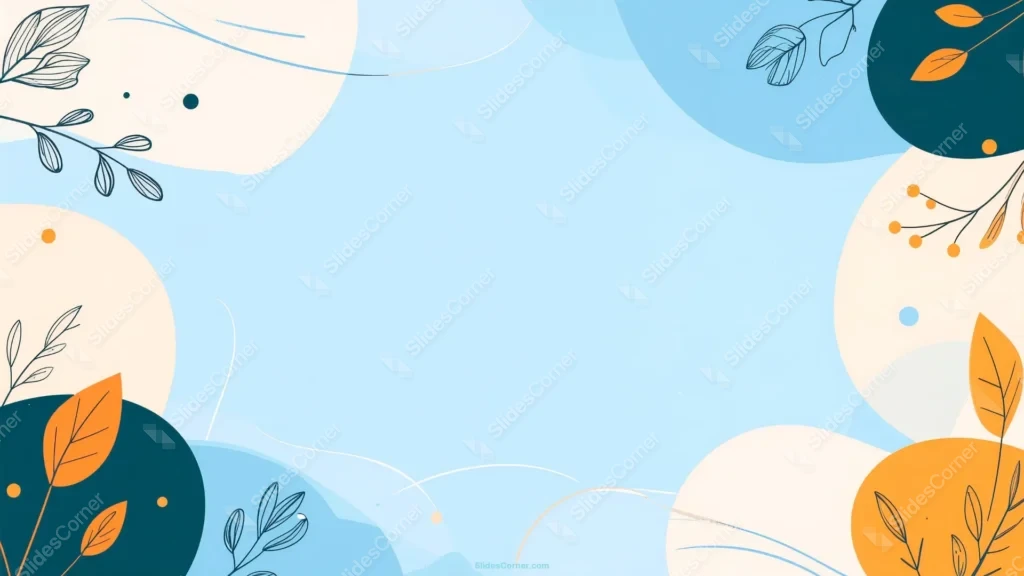
This background is for slides that need a light, decorative frame while the middle stays completely clear for your message. This aesthetic PPT background layers soft blue circles, cream discs, and ink-drawn foliage around the edges, leaving a calm sky-blue window in the center for titles and text. It is a free HD 16:9 download with no watermark, ready to drop into PowerPoint, Google Slides, or a desktop wallpaper.
What this aesthetic PPT background actually looks like
The whole composition is built from overlapping circles rather than the usual freeform blobs. Cream discs (#FBF3E6) and deep teal-navy circles (#133B4C) stack at different sizes, and where they meet you get little pockets of depth, almost like looking through scattered lens bokeh. Sitting on top are two very different kinds of botanicals: fine line-art branches drawn as thin navy outlines, and a handful of solid marigold-orange leaves (#F4991F) in the lower corners. Small orange dots and berry clusters are sprinkled between them, plus a few loose cream line-swooshes that trail across the empty space.
The design thinking behind the blue circle background
I leaned on circles because they read as calm and friendly in a way sharp shapes never do, and stacking them at different opacities makes the corners feel layered without adding visual weight. The center is the real feature: a pale blue that lightens toward the middle, tuned so dark headings and body copy keep a comfortable contrast even on a washed-out projector. Mixing outlined leaves with solid orange ones was a deliberate contrast trick. The line-art foliage stays quiet and airy, so it never fights your text, while the few solid orange leaves and dots act as warm punctuation that stops the palette from drifting too cool. I placed the heaviest navy circles and boldest orange leaves in the bottom-left and right corners to give the layout a stable base, so a title sitting up top always feels anchored. This one suits decks that want to look polished but approachable: school and classroom lessons, wellness and self-care talks, small-business pitches, event invites, and seasonal or spring-themed slides.
Where to use it in your presentation
The clear center makes it an easy pick for cover slides, agenda pages, section breaks, and quote layouts. Because the decoration lives strictly around the border, you can reuse the same image across an entire deck and still have room for charts, photos, or bullet lists in the middle.
- Free download with no watermark and no account required
- HD 16:9 that fits any modern widescreen PPT or Slides canvas
- Circle-based border design that keeps the center open for text
- Blue, cream, navy, and orange palette that pairs with dark, simple type
- Line-art and solid leaves give a decorative look without visual clutter
- Works as a PowerPoint background, a Google Slides theme, or a wallpaper
How to apply the background in PowerPoint and Google Slides
In PowerPoint, go to the Design tab, choose Format Background, select Picture or texture fill, and Insert the downloaded image. Use “Apply to All” to set it across every slide. For a version you cannot accidentally move, open View → Slide Master and place the image on the master layout instead.
In Google Slides, open Slide → Change background, click Choose image next to Image, and upload the file. Press “Add to theme” to apply it to the entire presentation at once.
A quick legibility tip: keep text inside that central blue window and use one dark tone for it, like a deep charcoal rather than pure black, which sits more softly on the light blue. If a heading has to run toward the busy circle corners, tuck a subtle semi-transparent panel behind it so the letters stay crisp against the leaves and dots.
Frequently asked questions
Is this aesthetic PPT background free? Yes. Download and use it at no cost, with no watermark and no sign-up.
Will it work in Google Slides? It will. The same file loads into Google Slides as a slide or theme background just like it does in PowerPoint or Keynote.
What size and resolution is it? It is HD at a 16:9 widescreen ratio, so it fills a standard modern slide edge to edge with no stretching.
Can I set it as a wallpaper? Yes. The 16:9 shape fits most laptop and desktop screens, so it doubles as a soft, decorative wallpaper.
Specs
- 1920 x 1080 px · 16:9 widescreen
- JPG, high quality, no compression artefacts
- PowerPoint · Google Slides · Keynote · Canva
- No watermark · no sign-up
- Free for personal and commercial use
You can use this Breezy Blue Circle PPT Background for Modern Presentation Decks as a Wallpaper or use it as a background for slides.
Looking for something different? Browse all our free PPT Backgrounds, or see how to set a background in PowerPoint and Google Slides.








