
This is a Google Slides and PowerPoint free template designed for aesthetic presentations.
Free 30-slide business plan template with deep green palette, native charts and Gantt — for PowerPoint and Google Slides.
This template is for anyone who has to turn a business plan into something a room will actually sit through: founders pitching investors, consultants presenting a strategy review, or a team walking leadership through next year’s numbers. It’s built as a free presentation template, fully editable, with no watermark, and it works the same way whether you open it in PowerPoint or Google Slides.
The deck runs 30 slides and follows the shape a real business plan takes: introduction, company and team, problem, market comparison, solution, product, roadmap, a case study, projections, and a closing section with credits and license terms. Nothing here is decorative filler — every layout maps to a section a business plan actually needs, so you can drop your own content in without having to invent a new slide from scratch.
What’s inside: the slide inventory
Each layout in this PowerPoint template and Google Slides file does a specific job. Here’s what you get and when to reach for each one:
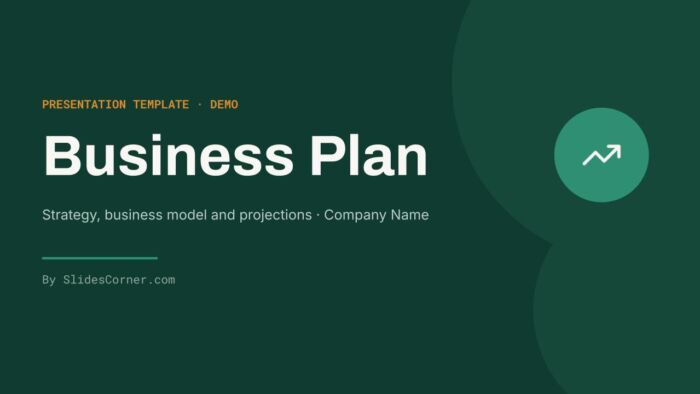
- Cover — main title over a deep green ground with a circular mark, sets the tone for the whole deck.
- Table of contents — two-column layout with monospaced numbering and small icons next to each section.
- Introduction / standfirst — two balanced text columns plus a figure card, good for framing the plan before the detail starts.
- Section divider (two styles) — one on deep green with a large numeral, one on a lighter linen ground with a right-aligned composition, for splitting the deck into acts.
- Company overview — running text on the left, a dark panel with a headline figure and three indicators on the right.
- Team — three profile cards with a circular portrait, name, role and contact line.
- Problem statement — dark side panel next to a three-point icon list.
- Them and Us comparison — two facing cards, one light and one dark, for positioning against competitors.
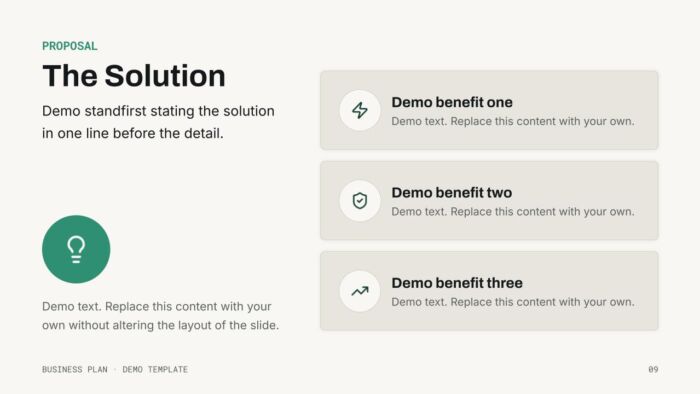
- Solution — headline and icon on the left, three stacked benefit cards on the right.
- SWOT matrix — four quadrants, each with its initial in a small medallion.
- Product overview — three columns, each with an icon in a dark medallion.
- Roadmap — numbered list with hairline separators next to a panel introducing the plan’s horizon.
- Big-idea slide — a large-scale headline with nothing but two background circles, for the one sentence you want people to remember.
- Timeline infographic — a horizontal axis with milestones alternating above and below it.
- Case study — three linked blocks (challenge, solution, results) connected with continuity arrows.
- Text and image — a straightforward half-and-half split with an editable image placeholder.
- Two topics — two equal-weight cards with a large icon, subhead and paragraph.
- Full-bleed image statement — a photo with a headline and standfirst at the foot, on deep green.
- Three priorities — three cards with a circular numeral, one highlighted in deep green.
- Testimonial — a large quote with attribution and a background quotation mark.
- Key figure — a big number as the opening of the projections section, with three secondary metrics.
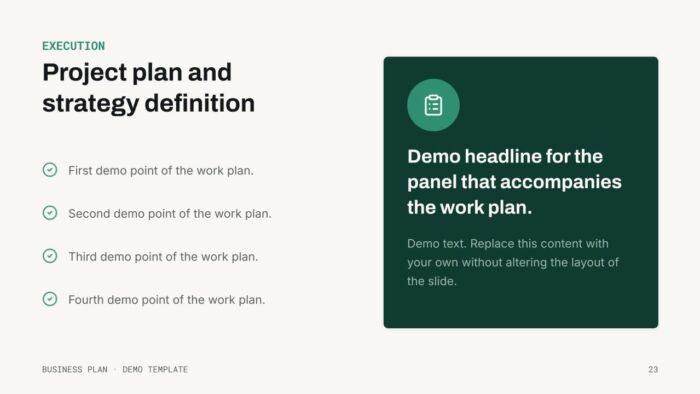
- Execution / checklist — a task list next to a dark panel with a supporting headline.
- Gantt chart — rounded bars over a six-period grid.
- Projection chart — a native, editable column chart with a takeaway card alongside it.
- Map with pins — a placeholder map with numbered markers and a legend.
- Credits, license and closing slides — required by the terms of use, plus a contact slide to close the deck.
The design decisions behind it
I built this deck around a paper-and-deep-green palette because business plans get read in two very different conditions: a bright meeting room during a pitch, and a dim projector screen during an all-hands. Paper (#F8F7F4) and Linen (#E7E5DD) keep the backgrounds calm and non-competing with charts, while Graphite (#14181B) carries the body text at a contrast ratio that holds up even when the projector bulb is tired. Deep green (#103B30) does the heavy lifting on covers, dividers and stat panels — dark enough to read as serious and financial without going black, and it pairs cleanly with Signal green (#2F8F73) and Amber (#D98A2B) for the small highlights, chart accents and the one card you want to stand out on a slide of three.
The type scale keeps headings in Archivo, a grotesque with enough weight to survive a back-row read, while body copy and standfirsts sit in Inter, which stays comfortable at smaller sizes across long paragraphs. Roboto Mono is reserved for the parts that behave like data — slide numbers, eyebrows, KPIs, Gantt labels — so numbers never get confused with narrative text. That’s also why the SWOT matrix, the roadmap and the timeline all keep a fixed grid: a business plan usually gets edited by more than one person, and a rigid structure means nobody can quietly break the layout by adding one extra line. The white space around the key-figure slide and the big-idea slide is left empty on purpose — those two are meant to carry a single message each, not compete with supporting text.
Where to use this template
This layout set fits a formal business plan, an investor pitch deck, a strategy or planning review, or an internal roadmap presentation. The SWOT matrix, Gantt chart and projection chart make it especially suited to anything that needs to show a plan and the numbers behind it in the same deck, rather than splitting strategy and data into separate files.
How to use it in PowerPoint and Google Slides
In PowerPoint: open the .pptx file directly — no conversion needed. To change fonts or colors everywhere at once, go to View > Slide Master and edit the master and layouts there rather than on individual slides; anything you change in the master cascades to every slide using that layout. To swap an image without distorting the crop, right-click the placeholder, choose Change Picture, and pick your file — the frame and crop stay intact.
In Google Slides: use File > Make a copy to get your own editable version, or File > Import slides if you want to pull specific layouts into an existing deck. Theme-wide changes to color and type go through Slide > Edit theme, which works the same way PowerPoint’s Slide Master does — one edit, applied everywhere. Images can be replaced by clicking the placeholder and using Replace image, which preserves the existing crop and position.
A couple of things worth doing before you present: keep body text at 18pt or larger anywhere it’ll be read from more than a few meters away, since that’s the point where thin body copy starts to disappear under room lighting. And resist the urge to bold or resize text to make a point stand out — every layout already has a hierarchy built in (eyebrow, headline, standfirst, body), and breaking that order to emphasize one line usually makes the whole slide harder to scan, not easier.
FAQ
Is this template free? Yes. It’s a free download, fully editable, with no watermark on any slide.
Does it work in Google Slides, or only PowerPoint? Both. The .pptx opens natively in PowerPoint, and the same file imports cleanly into Google Slides with its theme, charts and layouts intact.
Can I change the colors and fonts? Yes — both are set at the theme level (Slide Master in PowerPoint, Edit theme in Google Slides), so a single edit updates every slide that uses those styles.
What size and format is it? 16:9 widescreen, built for standard modern displays and projectors, delivered as a .pptx with a Google Slides copy.
Can I use it for client or commercial work, and do I need to give credit? You can use it for your own business plan, pitch or client work. Keep the Credits slide in the file, and don’t register the template or its elements as your own trademark, resell it, or redistribute it as a template file.
Create and edit this Minimal Deep Green Business Plan Template for Investor Pitches and Strategy Reviews with Google Slides, right in your browser with no special software required. Multiple people can work at the same time, and everyone will always have the latest version. This Business, Professional and creative theme is also available for PowerPoint.
Choose the layout you like from this template, customize the icons, modify the titles of your presentation and highlight the most important content to impress your audience.
To get your viewers's attention you need to create the best presentation possible. With a neat and clear design you will cause a great impact. Use this Business Plan Presentation Template With a Deep Green Grid to communicate your idea clearly so your audience gets the message quickly and easily. A nice and well designed template like this Minimal Deep Green Business Plan Template for Investor Pitches and Strategy Reviews will give you the professional image you need for a successful presentation.
- Template 100% editable and easy to modify colors, images and text
- Different slides to impress your audience
- Choose the layout from your theme that best suits your needs
- Template contains maps, tables, graphs and time lines that can be easily edited
- Includes free icons to enhance your presentation
- This theme was designed to be used in Google Slides and Microsoft PowerPoint
- 16:9 widescreen format suitable for all types of screens
- Includes information about fonts, colors, and credits of the free resources used
Download free template
Tags for this theme
About Google Slides and how to get free templates
Google Slides is a very powerful and free tool that has become very popular among educators and business people and you can use it to deliver your presentations. Here you can find completely free Google Slides themes so you can create your presentation like a real pro.
In the last years, Google Slides has evolved including several of the features other presentation tools offered. You can easily access, edit and make presentations on your desktop, tablet or smartphone.
Presentations are easily shared and edited in real time so you can collaborate on your theme at the same time. In this Minimal Deep Green Business Plan Template for Investor Pitches and Strategy Reviews you can write comments and assign tasks to develop ideas as a team. Learn more about Google Slides here.
You can check our free Google Slides Themes and add them to your Google Drive account. Just go to the Download Theme section.
Google Slides has many benefits for presenters. It encourages teams to collaborate online & real-time, it is free and more.