You might also like:
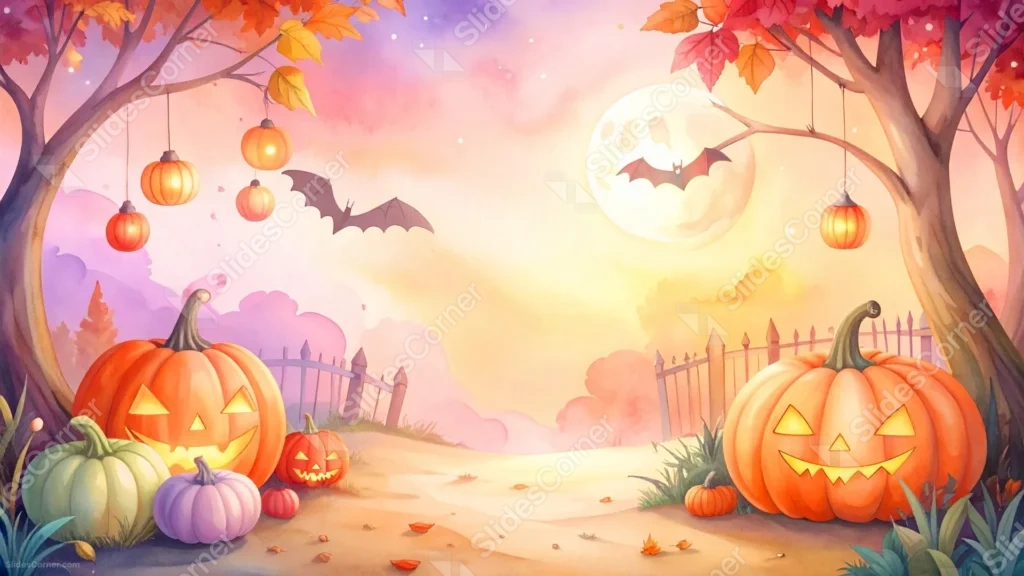
This cute Halloween background for PowerPoint paints a soft pastel sky behind a round, glowing moon, framed by two autumn trees hung with tiny lantern pumpkins.
Along the bottom, a cheerful mix of orange, green, purple, and pink jack-o-lanterns sit beside a picket fence, leaving a wide, open path down the middle.
What This Cute Halloween Background Looks Like
A large, pale moon glows softly behind a single bat, set against a watercolor sky that fades from lavender to peachy pink and warm yellow.
Autumn trees with red and gold leaves arch in from both top corners, their branches strung with small glowing lantern pumpkins.
At the base, rounded jack-o-lanterns in a cheerful mix of colors, orange, sage green, lilac, and blush pink, sit beside a low picket fence, with a clear sandy path running between them.
Where This Cute Halloween Background For PowerPoint Fits
- Kid-friendly Halloween party invitations and classroom slides
- Cute, pastel-themed autumn presentations
- Small business promotions for the fall season
- Any title slide wanting a gentle, whimsical Halloween mood
Design Choices Behind These Pastel Pumpkins
I mixed the pumpkin colors well beyond the usual orange, adding sage, lilac, and blush tones so the whole scene reads as playful rather than traditionally spooky.
Keeping the sandy path completely clear down the center, with pumpkins and trees pushed to the sides, was deliberate: it’s the one genuinely open zone in this piece for a headline.
Painting the sky in soft watercolor pastels rather than a dark night tone keeps this squarely in cute-and-cozy territory instead of eerie.
How to Apply It in PowerPoint
- Go to Design > Format Background.
- Choose Picture or texture fill, then Insert from file.
- Click Apply to All to carry it across the whole deck.
How to Apply It in Google Slides
- Open Slide > Change background.
- Click Choose image and upload the downloaded file.
- Select Done, repeating on any other slides you want to match.
Legibility Tip for This Cute Halloween Background
Keep your headline on the open sandy path in the middle, using a dark brown or plum font, since that area stays clear of pumpkins and trees.
Frequently Asked Questions
Is this cute Halloween background free?
Yes, it’s a free download with no watermark and no account required.
Does it work in Google Slides too?
Yes, it’s a standard image file, so it applies the same way in both PowerPoint and Google Slides.
What resolution is included?
1920×1080 px, HD 16:9, suited to slides and to a desktop or phone wallpaper.
Can I use it as a wallpaper?
Yes, the 16:9 ratio matches most laptop and desktop screens.
Features at a Glance
- HD 1920×1080 resolution, 16:9 ratio
- Free download, no watermark
- Multicolor pastel jack-o-lanterns, not just orange
- Soft watercolor sky with a glowing moon and bat
- Wide, open path down the center for text
- Works as a PowerPoint background, Google Slides background, or wallpaper
Specs
- 1920 x 1080 px · 16:9 widescreen
- JPG, high quality, no compression artefacts
- PowerPoint · Google Slides · Keynote · Canva
- No watermark · no sign-up
- Free for personal and commercial use
You can use this Adorable Cute Halloween Background For PowerPoint as a Wallpaper or use it as a background for slides.
Looking for something different? Browse all our free PPT Backgrounds, or see how to set a background in PowerPoint and Google Slides.